
Blog
IAM Chapter 6, Part 5: Reading the List
Every entry has an address. The address is not the identity.
On this page
Part of the IAM study series.
Kerberos used the master list to look up keys. That was the KDC reading its own database. LDAP is how an application reads the same list.
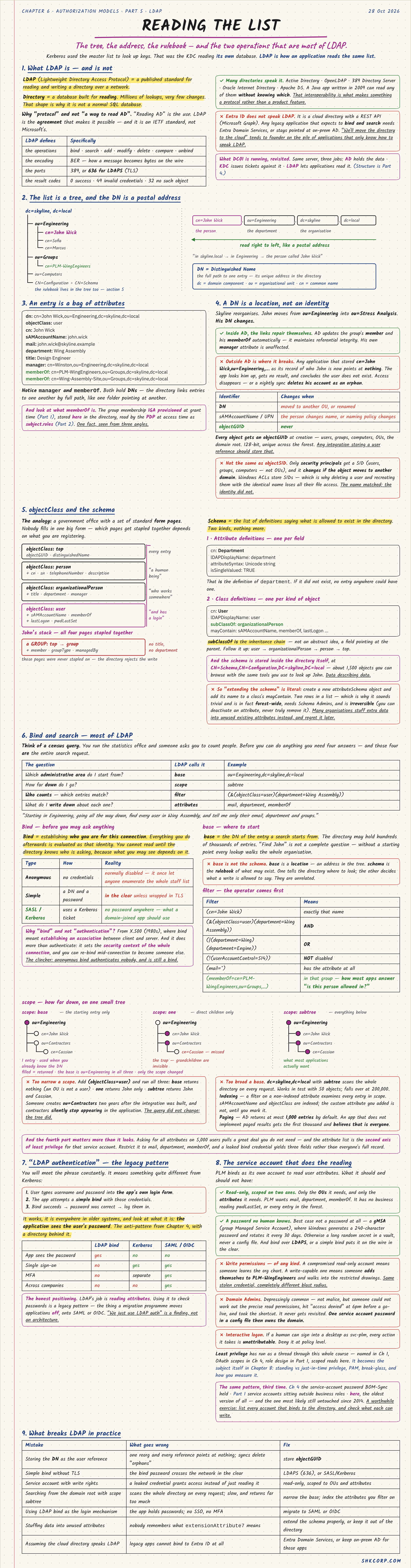
LDAP (Lightweight Directory Access Protocol) is a published standard for reading and writing a directory over a network. A directory is a database built for reading: millions of lookups, very few changes. The protocol is an agreement, not a product, which is why OpenLDAP, 389 Directory Server, and AD all speak it. Entra ID doesn't. It's a REST API, and that surprises many legacy apps on the way to the cloud.
1. The List Is a Tree, and the DN Is a Postal Address
cn=John Wick,ou=Engineering,dc=skyline,dc=localA DN (Distinguished Name) is the full path to one entry, read right to left like an address: in skyline.local, in Engineering, the person called John Wick. dc is a domain component, ou an organisational unit, cn a common name.
An entry is a bag of attributes: objectClass, mail, department, manager, memberOf. Some hold DNs, so entries link to each other. memberOf is the same fact seen three ways: IGA provisioned it at grant time, the directory stores it, and the PDP reads it as subject.roles.
2. A DN Is a Location, Not an Identity
Skyline reorganises, and John moves to ou=Stress Analysis. His DN changes. Inside AD the links repair themselves, but an app that stored his old DN as its user record now points at nothing, and a nightly sync may delete him as an orphan.
| Identifier | Changes when |
|---|---|
| DN | Moved to another OU, or renamed |
sAMAccountName / UPN | The person changes name, or naming policy changes |
objectGUID | Never |
Every object gets an objectGUID at creation. Any integration storing a user reference should store that. Don't confuse it with objectSID, which can change if the object moves domains: delete and recreate someone with an identical name and they lose every ACL entry.
3. objectClass and the Schema
Think of a government office with standard form pages, where the pages stapled together depend on what you're registering. John's stack is top → person → organizationalPerson → user.
The schema is the definitions of what may exist in the directory: attribute definitions (one per field) and class definitions (one per kind of object). "Extending the schema" means adding two rows, and it's trivial, but it's forest-wide, needs Schema Admins, and can't be undone. Many organisations stuff data into unused extension attributes instead, and regret it later.
4. Bind and Search: Most of LDAP
Bind comes first: establishing who you are for this connection. Everything afterwards is evaluated as that identity.
| Type | How | Reality |
|---|---|---|
| Anonymous | No credentials | Normally disabled; anyone can enumerate the staff list |
| Simple | A DN and a password | In the clear unless wrapped in TLS |
| SASL / Kerberos | Uses a Kerberos ticket | What a domain-joined app should use |
Search then needs four answers, like a census request. "Starting in Engineering, going all the way down, find every user in Wing Assembly, and tell me only their email, department and groups":
| The question | LDAP calls it | Example |
|---|---|---|
| Where do I start? | base | ou=Engineering,dc=skyline,dc=local |
| How far down? | scope | subtree |
| Which entries match? | filter | (&(objectClass=user)(department=Wing Assembly)) |
| What do I write down? | attributes | mail, department, memberOf |
Filters put the operator first: & is AND, | is OR, ! is NOT. A common one, (memberOf=cn=PLM-WingEngineers,ou=Groups,...), is how many apps answer "is this person allowed in?"
Scope is base (only that entry), one (direct children), or subtree (everything below), and the classic trap is one. Someone creates ou=Contractors two years after the integration was built, and contractors silently stop appearing. The query didn't change; the tree did. Too broad hurts as well: searching from the root on an unindexed attribute works in tests with 50 objects and falls over at 200,000. AD also returns at most 1,000 entries by default, so an app without paged results quietly believes those are all there are.
Asking for all attributes pulls down data you don't need, and the attribute list is the second axis of least privilege for a service account.
5. "LDAP Authentication"
You'll meet this phrase constantly, and it means something quite different from Kerberos. The app shows its own login form, takes the username and password, and attempts a bind with them. If the bind works, the user is in.
| LDAP bind | Kerberos | SAML / OIDC | |
|---|---|---|---|
| App sees the password | Yes | No | No |
| Single sign-on | No | Yes | Yes |
| MFA | No | Separate | Yes |
| Across companies | No | No | Yes |
It's everywhere, and it's the anti-pattern from the SAML chapter with a directory behind it. LDAP's real job is reading attributes. "We just use LDAP auth" is a finding, not an architecture.
6. The Service Account That Does the Reading
PLM binds as its own account to read user attributes, so what should that account hold?
- Read-only, scoped on two axes: only the OUs it needs and only the attributes it needs.
- A password no human knows, ideally a gMSA, which Windows generates and rotates every 30 days.
- Never write permissions. A stolen read-only account is a leak. A stolen writer can add someone to
PLM-WingEngineers. - Never Domain Admins. It usually happens because someone couldn't work out the read permissions, and now the config file owns the domain.
- No interactive login. A human desktop session on
svc-plmmakes every action unattributable.
| Mistake | What goes wrong | Fix |
|---|---|---|
| Storing the DN as the user reference | One reorg leaves every reference orphaned | Store objectGUID |
| Simple bind without TLS | Password crosses the network in the clear | LDAPS (636), or SASL/Kerberos |
| Service account with write rights | A leak grants access, not just reading | Read-only, scoped to OUs and attributes |
| Searching the whole domain with no scope | Slow, and sees everything | Narrow the base, index filter attributes |
| LDAP bind as the login mechanism | App holds passwords; no SSO, no MFA | Migrate to SAML or OIDC |
🔴 CHECKPOINT: Study Notes
← Previous: The Shape of It · Back to the series start · Next: Joiner, Mover, Leaver →