
Blog
IAM Chapter 6, Part 3: The Sealed Ticket

Built for hostile terrain.
On this page
Part of the IAM study series.
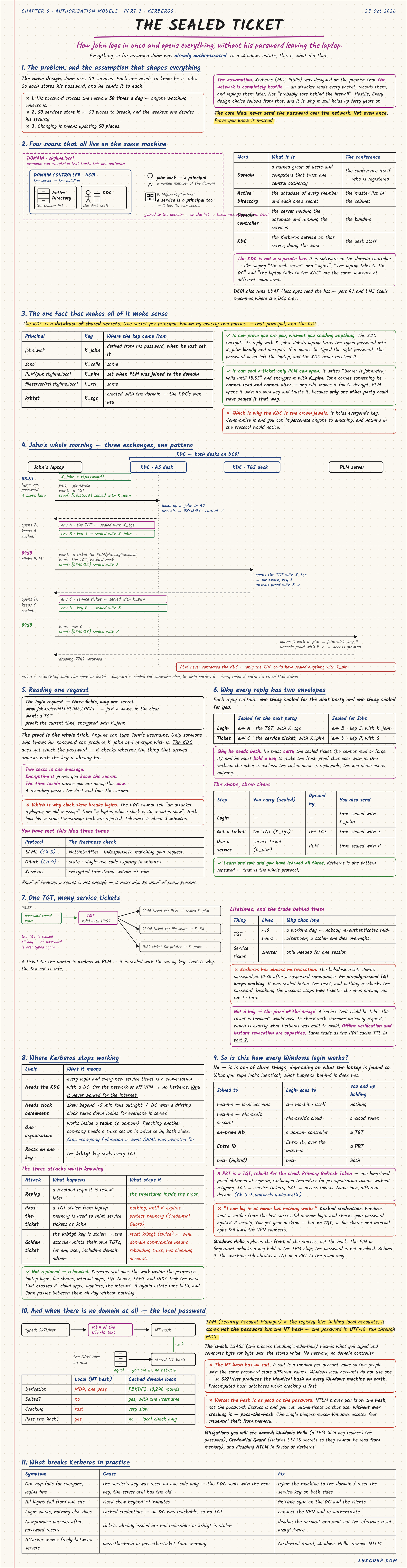
Everything so far assumed John was already authenticated. In a Windows estate, this is what did that.
If John used 50 services and each one checked his password, the password would cross the network 50 times a day, 50 systems would store it, and the weakest would decide his security. Kerberos (MIT, 1980s) was designed on the assumption that the network is completely hostile. Its core idea: don't send the password over the network. Not even once. Prove you know it instead.
1. Four Nouns on One Machine
| Word | What it is |
|---|---|
| Domain | A named group of users and computers that trust one central authority |
| Active Directory | The database of every member and each one's secret |
| Domain controller | The server holding that database and running the services |
| KDC | The Kerberos service on that server, doing the work |
The KDC isn't a separate box. It's software on the domain controller, so "the laptop talks to the KDC" and "the laptop talks to the DC" are the same sentence at different zoom levels.
2. The One Fact That Makes It Work
The KDC is a database of shared secrets. Each principal has one secret, known only to it and the KDC. John's key is derived from his password (K_john), PLM's was set when it joined the domain (K_plm), and the KDC has its own (K_tgs, the krbtgt account's key).
That gives two powers. The laptop can prove John knows his password by encrypting something with K_john, without sending it. And the KDC can seal a ticket only PLM can open, which John carries but can neither read nor alter.
3. John's Morning: Three Exchanges, One Pattern
| Time | John sends | He gets back |
|---|---|---|
| 08:55 Login, to the AS | His name, plus the time encrypted with K_john | TGT sealed with K_tgs, plus session key S sealed for him |
| 09:10 Open PLM, to the TGS | The TGT, plus the time encrypted with S | Service ticket sealed with K_plm, plus session key P sealed for him |
| 09:10 Use PLM, to the PLM server | The service ticket, plus the time encrypted with P | The drawing |
Each reply holds one thing sealed for the next party and one thing sealed for John. Learn one row and you've learned the whole protocol. PLM never contacted the KDC, because only the KDC could have sealed anything with K_plm.
The proof is the whole trick. Anyone can type John's username, but only someone who knows his password can produce K_john. The KDC doesn't check the password. It checks whether the thing that arrived unlocks with the key it already has.
The encrypted timestamp does two jobs: encrypting it proves the secret, and the time proves this is happening now, so a recording replayed later fails. That's why Kerberos breaks when clocks drift: tolerance is about 5 minutes. You've met this idea before. SAML has NotOnOrAfter, OAuth has state, and Kerberos has the timestamp.
One TGT, many service tickets. John types his password once. The TGT (valid about 10 hours) is reused all day to get a ticket per service, and a printer ticket is useless at PLM because it's sealed with the wrong key.
Almost no revocation. If the helpdesk resets John's password at 10:30 after a suspected compromise, the TGT he already holds keeps working. It's the same trade as the PDP cache TTL in Part 2: offline verification and instant revocation are opposites.
4. Where It Stops Working
Kerberos needs the KDC, so off the network or VPN there are no new tickets. It needs synchronised clocks. It works inside one organisation, which is why SAML and OIDC took over across companies. And it rests on one key.
| Attack | What happens | What stops it |
|---|---|---|
| Replay | A recorded request is resent later | The timestamp |
| Pass-the-ticket | A TGT stolen from laptop memory is reused as John | Nothing until expiry; protect memory with Credential Guard |
| Golden ticket | The krbtgt key is stolen, and the attacker mints TGTs for any user | Reset krbtgt twice; recovery means rebuilding trust |
Kerberos wasn't replaced so much as relocated. It still does the work inside the perimeter, while SAML and OIDC handle what crosses it, and a hybrid estate runs both all day.
5. Is This How Every Windows Login Works?
No. What you type looks identical, but the result depends on what the laptop is joined to:
| Joined to | Login goes to | You end up holding |
|---|---|---|
| Nothing | The machine itself | Nothing |
| Microsoft account | Microsoft's cloud | A cloud token |
| On-prem AD | A domain controller | A TGT |
| Entra ID | Entra ID, over the internet | A PRT |
| Both (hybrid) | Both | Both |
A PRT (Primary Refresh Token) is the TGT rebuilt for the cloud: a long-lived sign-in proof exchanged for per-application tokens without retyping. "I can log in at home with no VPN" works because of cached credentials: Windows checks a verifier from the last good login locally, which gets you the desktop but no TGT, so domain file shares stay unreachable. Windows Hello replaces the front of the process, unlocking a key in the TPM with a PIN or fingerprint so the password isn't involved.
No domain at all
Local accounts live in the SAM, which stores not the password but the NT hash: the UTF-16 password run through MD4 once, with no salt. Every Windows install produces the same hash for the same password, so cracking is fast. Worse, the hash is as good as the password: NTLM proves you know the hash, so an attacker can authenticate with it uncracked. That's pass-the-hash, and the mitigations are Windows Hello, Credential Guard, and removing NTLM.
| Symptom | Cause | Fix |
|---|---|---|
| One app fails for everyone | Service key reset on one side only | Reset the service key on both sides |
| All logins fail from one site | Clock skew over 5 minutes | Fix time sync |
| Login works, nothing else does | Cached credentials, no TGT | Connect the VPN and re-authenticate |
| Compromise persists after resets | Tickets not revoked, or krbtgt stolen | Wait out the lifetime; reset krbtgt twice |
🔴 CHECKPOINT: Study Notes
← Previous: The Whole Machine · Back to the series start · Next: Active Directory Structure →