
Blog
IAM Chapter 7, Part 1: The Badge Office

The office that issues passes and collects them back.
On this page
Part of the IAM study series.
Chapter 6 was the guard at the door, deciding. This chapter is the office that issues passes, changes what they open, and collects them back.
1. The Building
| Concept | In the building |
|---|---|
| Entitlement | One door |
| Application role | A keyring for one building |
| Business role | The set of keyrings handed out for a job |
| Identity | The person the badge belongs to |
| Account | That person's record in one building's own register |
| Badge office | The provisioning platform |
| HR | Who tells the office someone started, moved, or left |
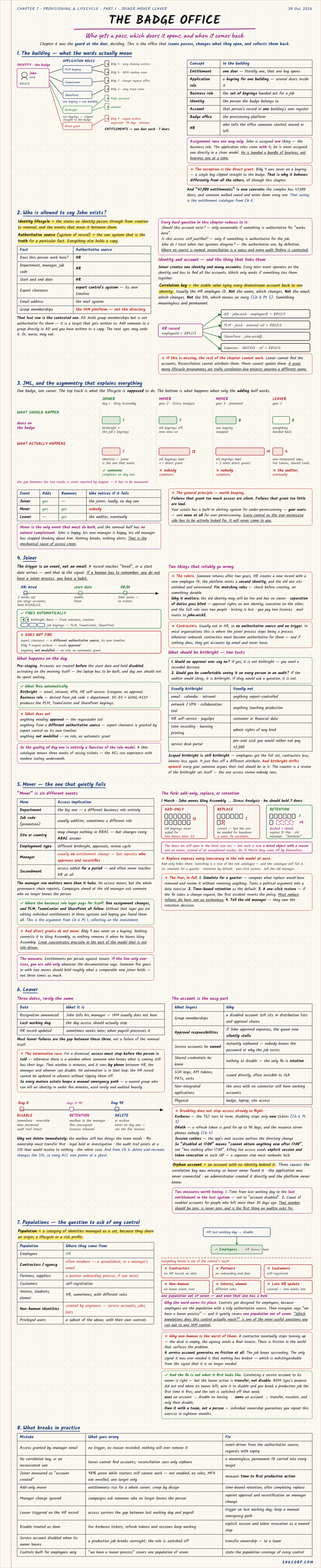
Assignment runs one way: John is given a bundle of keyrings, not keyrings one at a time. The exception is the direct grant. His engine archive access was never on a keyring. It's a single key clipped straight to the badge, which is why it behaves differently all through this chapter.
2. Who Is Allowed to Say John Exists?
The identity lifecycle is the states an identity passes through from creation to removal, and the events that move it between them. An authoritative source is the one system that holds the truth for a particular fact. Everything else holds a copy.
| Fact | Authoritative source |
|---|---|
| Does this person work here? Department, manager, dates | HR |
| Export clearance | Export control's system, on its own timeline |
| Email address | The mail system |
| Group memberships | The IAM platform, not the directory |
That last row is the contested one. AD holds group memberships but is a target that gets written to. Add someone directly in AD and you've edited a copy, and the next sync may undo it. Or, worse, it may not.
A joiner creates one identity and many accounts, so every later event must find them all. That needs a correlation key: a stable value tying each account to one identity, usually the HR employee ID. It can't be the name, the email, or the DN, because they all change. Without it, leavers can't find accounts and movers can't update them. Many lifecycle programmes are really correlation-key projects under a different name.
3. The Asymmetry That Explains Everything
Follow John's badge through his career. What should happen is 7 doors, 7, 8, then 0. What actually happens when only the adding half works:
| Event | Should hold | Actually holds | Who notices? |
|---|---|---|---|
| Joiner, day 1 | 7 | 7 | The joiner, loudly, on day one |
| Mover, year 2 | 7 | 12 | Nobody |
| Mover, year 3 | 8 | 19 | Nobody |
| Leaver, year 5 | 0 | 4 | The auditor, eventually |
Failures that grant too much access are silent. Failures that grant too little are loud.
Your users are a built-in alarm for under-permissioning, and nothing plays that role for over-permissioning. Mover is the only event that must both add and remove, and the removal half has no natural complainant. That's the mechanical cause of access creep.
4. Joiner
The trigger is an event, not an email. If a human has to remember, you have a habit rather than a process. Two weeks before John starts, HR marks him hired, and accounts are pre-staged but disabled. They activate on the start date, so he's working at 08:30 with no tickets.
Birthright and the business role fire automatically. Anything needing approval, anything from another authoritative source (export clearance), and anything not modelled does not. So the quality of day one is a direct function of the role model.
Two things reliably go wrong:
- The rehire. Someone returns after two years with a new employee ID, and the platform mints a second identity. Separation-of-duties checks now see two people. The fix is matching rules before creation, on something durable.
- Contractors. Usually not in HR, so there's no authoritative source and no trigger. Whatever onboards them must become authoritative for them, or they get accounts by email and never leave.
For birthright, ask two questions: would an approver ever say no, and would you be comfortable seeing it on every person in an audit? Birthright also drifts upward, as every year someone argues their tool should be in it.
5. Mover: The One That Quietly Fails
"Mover" is six different events: department, job code, site or country, employment type, manager, and secondment. A manager change moves no access, but the whole governance chain repoints, and campaigns aimed at the old manager ask someone who no longer knows the person.
This is where the business role layer pays for itself: one assignment changes, and PLM, TeamCenter, and SharePoint all follow. Direct grants don't move, though. Nothing connects the engine archive to Wing Assembly, so creep concentrates in the part of the model that isn't role-driven.
On 1 March John moves from Wing Assembly to Stress Analysis, and he should hold 7 doors. There are three ways to handle it:
| Approach | Result | Problem |
|---|---|---|
| Add-only | 12 doors, 22 after two moves | Old keyrings are never asked for |
| Replace | 7 doors | Correct, but the one he needed for handover is gone, so he escalates |
| Retention | 7 doors, plus 4 dated | The doors stay open, but each has a reason, an owner, and an expiry |
Replace exposes every inaccuracy in the role model at once. To roll it out: simulate for a quarter, compute what it would remove without removing anything; make time-bound retention the default; provide a one-click restore, because if the fix takes a change request, the first incident reverts the policy; and tell the old manager, who owns the retention decision.
To check yourself, plot entitlements against tenure. If the line only rises, you're add-only, whatever the documentation says.
6. Leaver
There are three dates, and they rarely match: resignation announced, last working day, and HR record updated (sometimes weeks later, with payroll). Most leaver failures live in the gap between them.
The termination race. For a dismissal, access must stop before the person is told, and the HR record can't be updated in advance without tipping them off. That window runs by phone, so every mature estate keeps a manual emergency path: a named group who can kill an identity in under five minutes, audited heavily.
Deprovisioning runs in stages: disable on day 0 (immediate and reversible), a retention period (mailbox to the manager, files reassigned, licences released), then delete around day 90. Don't delete on day one. The mailbox holds what the team needs, ownership must transfer, legal holds may apply, and audit trails point at a SID that would resolve to nothing.
The account is the easy part. Approval queues silently stall, owned service accounts are orphaned, shared credentials can only be rotated, and SSH keys, API tokens, and non-integrated apps are often invisible to IGA.
Disabling doesn't stop access already in flight. A Kerberos TGT runs to term, an OAuth refresh token can last up to 90 days, and app session cookies outlive the directory change. "Disabled at 17:00" means "cannot obtain anything new after 17:00". Killing live access needs explicit session and token revocation.
An orphan account has no identity behind it, because the key was missing, the app was never connected, or an admin created it directly. Two measures are worth having: time from last working day to the last entitlement in the last system, and the count of enabled accounts for people who left over 30 days ago. That number should be zero, is never zero, and is the first thing an auditor asks for.
7. Populations
A population is a category of identities managed as a set, because they share an origin, a lifecycle, or a risk profile.
| Population | Where they come from |
|---|---|
| Employees | HR |
| Contractors, agency | Often nowhere: a spreadsheet or a manager's email |
| Partners, suppliers | A partner onboarding process, if one exists |
| Customers | Self-registration |
| Interns, students, alumni | HR, sometimes, with different rules |
| Non-human identities | Created by engineers: service accounts, jobs, bots |
| Privileged users | A subset of the above, with their own controls |
Controls get designed for employees, and then everyone says "we have a leaver process". It quietly covers one population out of seven. "Which populations does this control actually reach?" is one of the most useful questions you can ask of any IAM control.
Non-human is the worst. A contractor eventually stops turning up, but a service account generates no friction at all: the job keeps succeeding. And the fix isn't what it first looks like. BOM-Sync's purpose didn't end when its owner left, so wire it to disable and you break a production job. If someone uses an account, disable it when they leave. If they own it, transfer it first, and own it with a team rather than a person.
| Mistake | What goes wrong | Fix |
|---|---|---|
| Access granted by manager email | No trigger, no reason, never removed | Event-driven, with expiry on requests |
| No correlation key | Leaver can't find accounts | A meaningless, permanent ID in every target |
| Joiner measured as "account created" | 98% green while starters still can't work | Measure time to first productive action |
| Add-only mover | Creep by design | Time-bound retention, after simulating replace |
| Leaver triggered on the HR record | Access survives until payroll catches up | Trigger on last working day |
| Disable treated as done | Tickets, tokens, and sessions keep working | Revocation as a named step |
| Controls built for employees only | Covers one population of seven | State each control's population coverage |
🔴 CHECKPOINT: Study Notes
← Previous: Reading the List · Back to the series start · Next: Out and Back →