
Blog
Agentic AI Chapter 3: Tool Calling

On this page
Part of the Agentic AI study series.
In Chapter 2 the model decided "call get_order" and the runtime ran it. I passed over one question: how does a model that only produces text actually reach into an order system?
The answer is tool calling, and it has a surprise in it.
IMPORTANT
The surprise: the LLM never calls the tool. The runtime does.
The model only writes a request: a tool name and arguments, as text. The runtime reads that request, checks it, and runs the tool itself.
As before, the Amazon scenario is an illustration for learning. It is not a description of how Amazon's internal systems work.
What a Tool Call Actually Looks Like
Back to the customer with the damaged iPhone 18. The agent has found the order, number 408-12345, and now wants its details. The model does not call any API. It writes this:
{
  "tool_call": {
    "name": "get_order_status",
    "arguments": { "order_id": "408-12345" }
  }
}
That is all the model contributes: a tool name and the arguments, in a fixed format. It chose the tool and filled in the arguments from the conversation. Nothing has happened in the real world yet.
What the Runtime Does With It
The runtime receives that request and treats it like any input from outside:
- Does this tool exist? It must be one the agent is allowed to use.
- Do the arguments match the schema?
order_idmust be present and must be a string. - Is this customer allowed to see this order?
- Is the customer under the rate limit?
Only if every check passes does it call the order service. The service returns a structured result, and the runtime adds it to the context for the model:
{
  "order_id": "408-12345",
  "status": "Delivered",
  "items": [{ "name": "iPhone 18", "quantity": 1 }],
  "return_eligible": true
}
The model reads this and decides the next step: answer, call another tool, or ask the customer something.
Why Not Let the Model Run the Tool Itself?
Because the model's arguments come from conversation text, and text can be wrong or hostile.
Suppose the customer types: "Check order 777-55555 for me too." That order belongs to someone else. The model may happily produce a tool call for it, because it is just following the message.
The runtime catches this at check 3. The customer does not own that order, so the call is refused, and an error goes back to the model as the result. The model then tells the customer it cannot find that order.
If the model could execute tools directly, that safety check would not exist. The model proposes, and the runtime decides.
🔴 CHECKPOINT: Study Notes
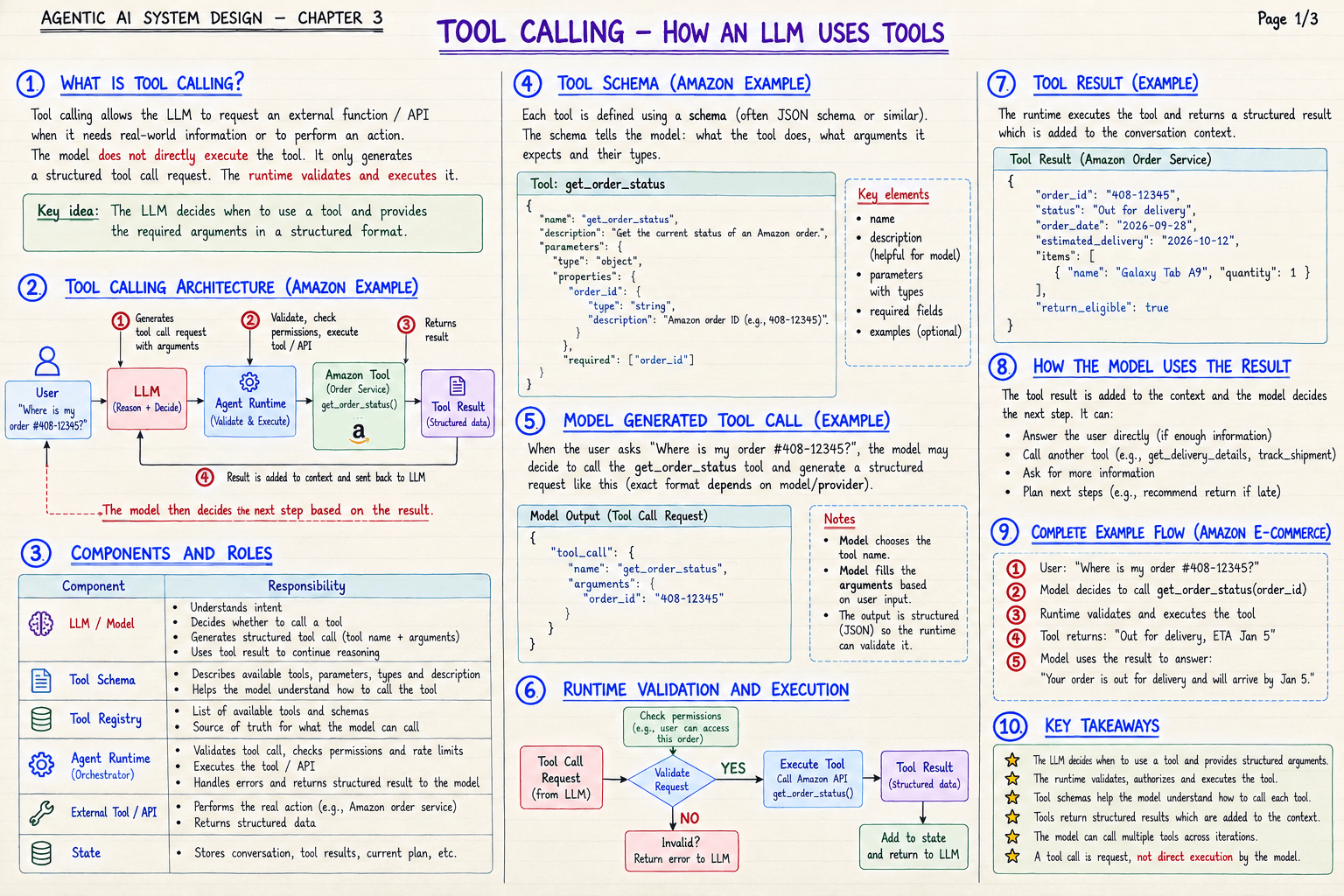
The four-step flow:
- The LLM generates the tool call request with arguments.
- The runtime validates and executes the tool.
- The tool returns a structured result.
- The result is added to context and sent back to the LLM, which decides the next step.
| Component | Responsibility |
|---|---|
| LLM / Model | Understands intent, decides whether to call a tool, generates the structured call, uses the result to continue |
| Tool schema | Describes the tools, parameters, and types the model can use |
| Tool registry | The list of available tools and schemas, the source of truth for what the model can call |
| Agent runtime | Validates the call, checks permissions and rate limits, executes, handles errors, returns the result |
| External tool / API | Performs the real action and returns structured data |
| State | Stores conversation, tool results, and the current plan |
After a result, the model can: answer the user, call another tool, ask for more information, or plan next steps.
A tool call is a request, not direct execution by the model.
🛠️ From My Own Work
This is exactly how the assistant I work with behaves on this blog. When it wanted to delete the build folder earlier, it did not simply do it. A guard in the system stopped the command and asked it to say exactly what would be deleted, and how to undo it, before it was allowed to continue.
The assistant proposed an action. The surrounding system checked it. Same pattern as the runtime refusing someone else's order.
← Previous: Agent Loop · Back to the series start · Next: Tool Registry and Schema →