
Blog
System Design: Multi-Tenant SaaS - High-Level Overview

On this page
- Part 1️⃣: Multi-Tenant SaaS Fundamentals
- 🔴 CHECKPOINT 1: Remember
- 📚 Key Terms
- 📊 Real-World Example: Microsoft 365
- 🛡️ Isolation Must Exist At:
- 🔒 GOLDEN RULE
- 🗄️ How Can Tenant Data Be Stored?
- Model A: Shared Database + Shared Schema (Most Common) ⭐⭐⭐
- Model B: Shared Database + Separate Schemas (Good Balance) ⭐⭐
- Model C: Separate Database per Tenant (Highest Isolation) ⭐
- 📋 Comparison of Database Models
- 🔴 CHECKPOINT 3: Which One to Choose?
- 🏗️ Schema vs Database: Building Analogy
- ❌ Common Misconceptions
- Part 2️⃣: Request Flow & Implementation
- 🔴 CHECKPOINT 2: Principle
- 📡 How Does tenant_id Travel? (Request Life Cycle)
- 📊 What Happens at Each Step
- 🎟️ What is in the JWT?
- 🔄 Tenant Context Propagation
- ✅ API Gateway Responsibilities
- 🔧 Microservice Responsibilities
- 👥 Who Owns What? (Responsibility Matrix)
- 🔑 Key Principle
- 📊 Common Data Flow Patterns
- 🎯 Key Takeaways
One application / platform serves multiple customers (tenants) while keeping their data, config, permissions, and branding completely isolated.
Your SaaS Platform serves:
- Nike (Tenant A) → Users / Data / Config A
- Spotify (Tenant B) → Users / Data / Config B
- Adobe (Tenant C) → Users / Data / Config C
Each organization believes it has its own private environment. The challenge? Ensuring Nike's data never leaks to Spotify, and Spotify can never see Adobe's information.
Part 1️⃣: Multi-Tenant SaaS Fundamentals
🔴 CHECKPOINT 1: Remember
Multi-tenancy ≠ Database type
Multi-tenancy = Architecture for serving multiple tenants with isolation at many layers
This is critical. You can have a multi-tenant app with:
- Shared Database + Shared Schema
- Shared Database + Separate Schemas
- Separate Database per Tenant
The database choice doesn't define whether you're multi-tenant. Multi-tenancy is about architecture.
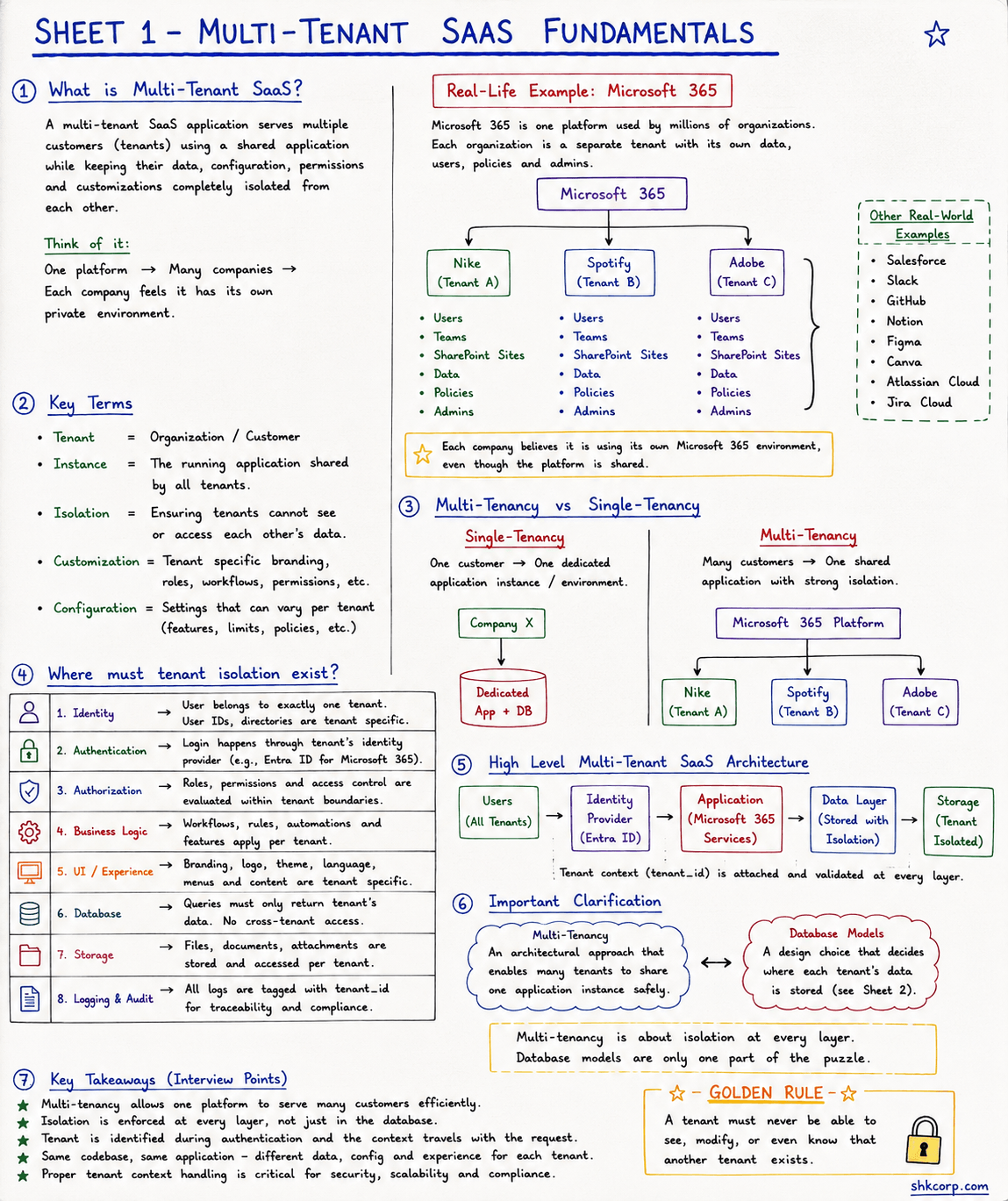
📚 Key Terms
| Term | Definition |
|---|---|
| Tenant | Organization / Customer |
| Instance | The running application shared by all tenants |
| Isolation | Ensuring tenants cannot see or access each other's data |
| Customization | Tenant-specific branding, rules, workflows, permissions |
| Configuration | Settings that vary per tenant (features, limits, policies) |
📊 Real-World Example: Microsoft 365
Microsoft 365 is one platform used by millions of organizations. Each is a separate tenant with its own data, users, policies, and admins.
Microsoft 365 Platform
├── Nike (Tenant A)
│   ├── Users, Teams, SharePoint Sites
│   ├── Data, Policies, Admins
├── Spotify (Tenant B)
│   ├── Users, Teams, SharePoint Sites
│   ├── Data, Policies, Admins
└── Adobe (Tenant C)
    ├── Users, Teams, SharePoint Sites
    ├── Data, Policies, Admins
Each company believes it's using its own Microsoft 365, even though they share the platform.
🛡️ Isolation Must Exist At:
✓ Identity → User belongs to exactly one tenant. User IDs are tenant-specific.
✓ Authentication → Login through tenant's identity provider (Entra ID, Okta, Auth0)
✓ Authorization → Roles/permissions evaluated per tenant
✓ Business Logic → Workflows, rules, automations apply per tenant
✓ UI / Theme → Branding, logo, language are tenant-specific
✓ Database → Queries filter by tenant_id
✓ Storage → Files stored and accessed per tenant
✓ Logging / Audit → All logs tagged with tenant_id
🔒 GOLDEN RULE
A tenant must NEVER be able to see, modify, or even know that another tenant exists.
🗄️ How Can Tenant Data Be Stored?
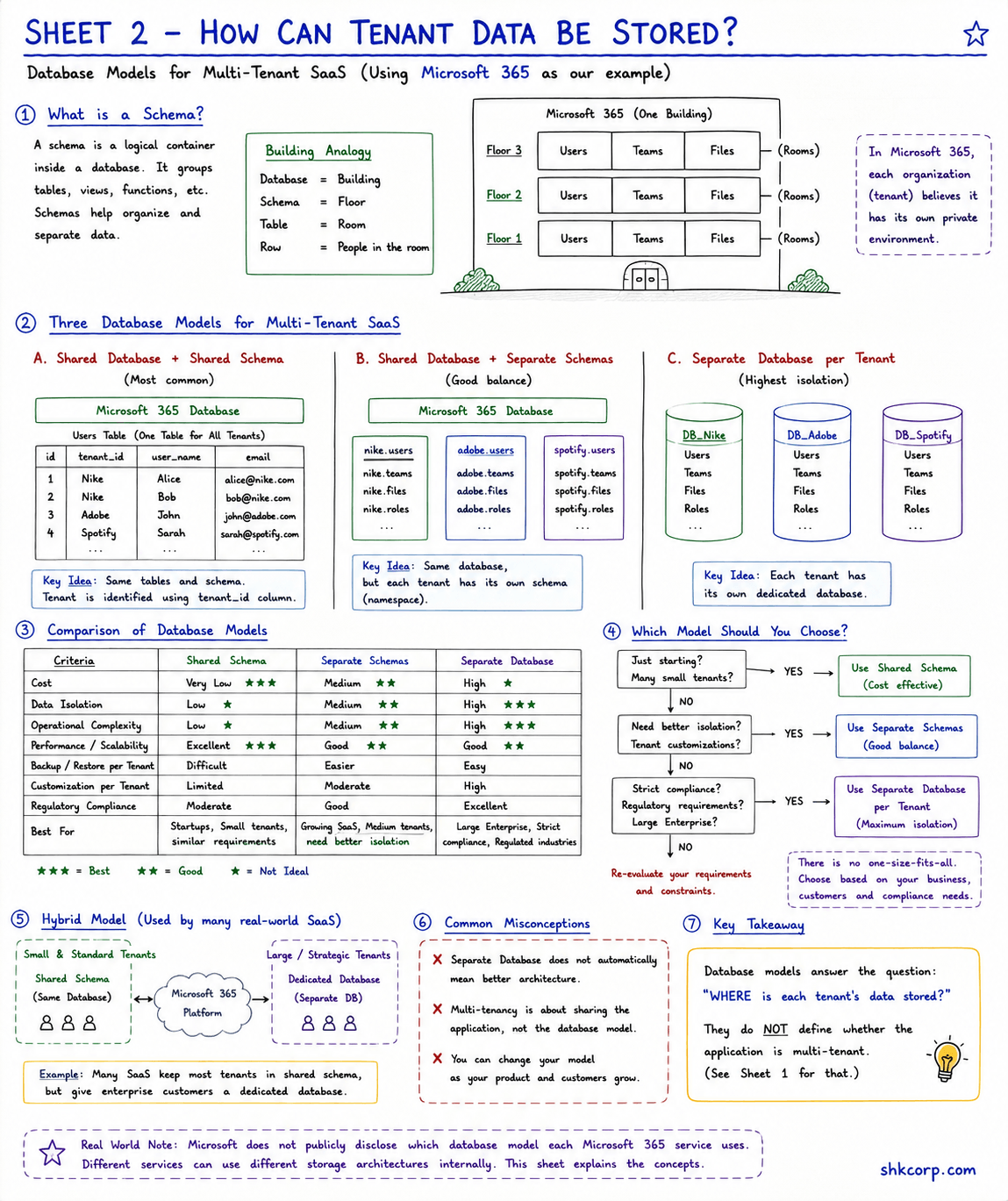
The database model answers: "WHERE is each tenant's data stored?"
Model A: Shared Database + Shared Schema (Most Common) ⭐⭐⭐
Setup: One database, one schema, all tenants share tables. Isolation via tenant_id column.
Users Table (One Table For All Tenants):
| id | tenant_id | user_name | |
|---|---|---|---|
| 1 | nike | Alice | alice@nike.com |
| 2 | nike | Bob | bob@nike.com |
| 3 | spotify | Sarah | sarah@spotify.com |
| 4 | adobe | John | john@adobe.com |
Pros: Low cost, easy ops, scalable
Cons: Risk if tenant_id filter missed, noisy neighbor problem
Best For: Startups, many small tenants, cost-sensitive
Model B: Shared Database + Separate Schemas (Good Balance) ⭐⭐
Setup: One database, each tenant gets its own schema (namespace).
Microsoft 365 Database
├── nike.users (Alice, Bob)
├── spotify.users (Sarah, Mike)
└── adobe.users (John, Lisa)
Pros: Better isolation, harder to leak cross-tenant data, easier per-tenant migration
Cons: More schemas → migration complexity
Best For: Growing SaaS, medium tenants, need better isolation
Model C: Separate Database per Tenant (Highest Isolation) ⭐
Setup: Every tenant gets a dedicated database.
Infrastructure
├── DB_Nike → Users, Teams, Files, Roles
├── DB_Spotify → Users, Teams, Files, Roles
└── DB_Adobe → Users, Teams, Files, Roles
Pros: Strongest isolation, easy per-tenant backup, easy compliance
Cons: High cost, operational complexity, complex migrations
Best For: Large enterprise, strict compliance, regulated industries
📋 Comparison of Database Models
| Criteria | Shared Schema | Separate Schemas | Separate DB |
|---|---|---|---|
| Cost | Very Low ⭐⭐⭐ | Medium ⭐⭐ | High ⭐ |
| Data Isolation | Low ⭐ | Medium ⭐⭐ | High ⭐⭐⭐ |
| Operational Complexity | Low ⭐ | Medium ⭐⭐ | High ⭐⭐⭐ |
| Backup/Restore per Tenant | Difficult | Easier | Easy ⭐⭐⭐ |
| Best For | Startups, Small tenants | Growing SaaS, Medium tenants | Large Enterprise, Strict compliance |
🔴 CHECKPOINT 3: Which One to Choose?
Just starting? Many small tenants?
→ USE MODEL A (Shared Schema) - Cost effective
Need better isolation? Growing platform?
→ USE MODEL B (Separate Schemas) - Good balance
Large enterprise? Strict compliance?
→ USE MODEL C (Separate DB) - Maximum isolation
Mix of small & large tenants?
→ USE HYBRID (Most Real-World SaaS)
- Small tenants: Shared Schema (cost-effective)
- Enterprise tenants: Separate Database (premium)
Real-World Note: Many SaaS use HYBRID. Microsoft 365 keeps thousands of small organizations in shared databases while giving enterprise customers dedicated databases.
🏗️ Schema vs Database: Building Analogy
Think of database structure like a building:
🏢 BUILDING = DATABASE
├── 1st Floor (Schema) = nike schema
│   ├── Room = Users table (Alice, Bob)
│   ├── Room = Teams table
│   └── Room = Files table
├── 2nd Floor (Schema) = spotify schema
│   ├── Room = Users table (Sarah, Mike)
│   ├── Room = Teams table
│   └── Room = Files table
└── 3rd Floor (Schema) = adobe schema
    ├── Room = Users table (John, Lisa)
    ├── Room = Teams table
    └── Room = Files table
Floors are completely isolated. Same rooms (tables) on each floor. In Microsoft 365, each organization truly believes it's using its own "building."
❌ Common Misconceptions
❌ "Separate Database = Better Architecture"
Reality: Separate database is a storage choice, not an architectural approach.
❌ "Multi-Tenancy = Must Share Everything"
Reality: Multi-tenancy is about isolation at every layer. Model C (separate DB) is still multi-tenant.
❌ "You Can Change Your Model Later"
Reality: Migrating from Shared Schema → Separate Schemas → Separate DB is complex. Choose wisely.
Part 2️⃣: Request Flow & Implementation
🔴 CHECKPOINT 2: Principle
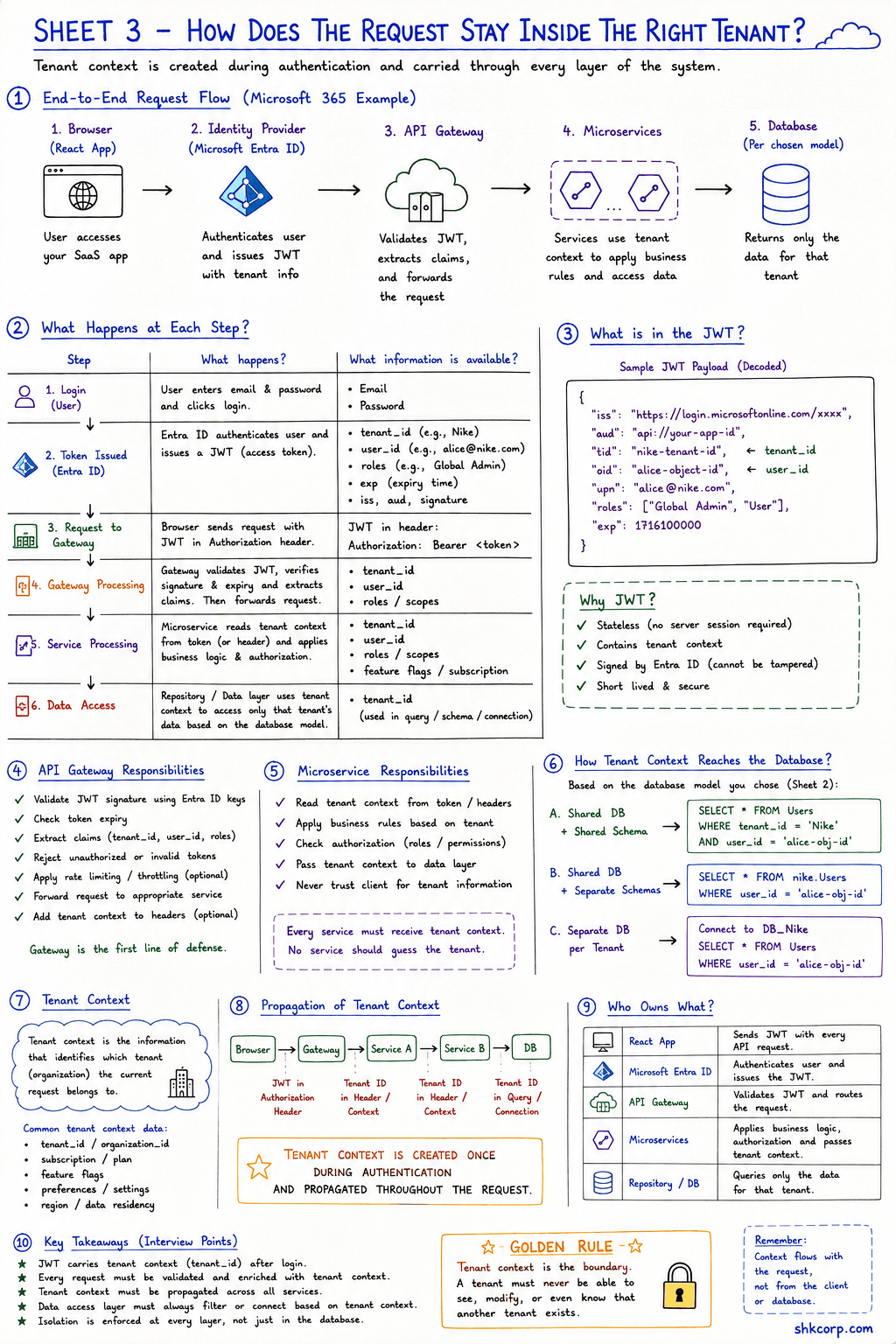
Tenant context is created ONCE (during authentication) and travels with the request end-to-end.
Once a user logs in and gets a JWT with their tenant_id, that context flows through every layer: API Gateway → Microservices → Database. Every component validates it received the correct tenant context.
📡 How Does tenant_id Travel? (Request Life Cycle)
React UI → API Gateway → Microservices → Database

1. User logs in → IdP issues JWT with tenant_id
2. React sends request with JWT in Authorization header
3. API Gateway validates token & extracts tenant_id
4. Gateway forwards request (JWT or headers) to services
5. Each service reads tenant_context → applies business logic
6. Repository/DB layer uses tenant context → applies in business logic
7. DB uses tenant context → data isolation
Sample JWT (Simplified):
{
  "sub": "12345",
  "email": "alice@nike.com",
  "tenant_id": "nike",
  "roles": ["Admin"]
}
📊 What Happens at Each Step
| Step | What Happens | Information Available |
|---|---|---|
| 1. Login (User) | User enters email & password | Email, Password |
| 2. Token Issued (Entra ID) | Authenticates user, issues JWT with tenant_id | tenant_id, user_id, roles, exp |
| 3. Request to Gateway | Browser sends request with JWT | Full JWT in Authorization header |
| 4. Gateway Processing | Validates JWT, extracts claims, forwards | tenant_id, user_id, roles (verified) |
| 5. Service Processing | Applies business rules, checks auth | tenant_id from JWT/headers (validated) |
| 6. Data Access (Database) | Uses tenant_id to filter queries | Only that tenant's data |
🎟️ What is in the JWT?
Sample JWT Payload (Decoded):
{
  "iss": "https://login.microsoftonline.com/xxx",
  "aud": "api://your-app-id",
  "tid": "nike-tenant-id",
  "oid": "alice-object-id",
  "upn": "alice@nike.com",
  "roles": ["Global Admin", "User"],
  "exp": 1716100000
}
Why JWT? ✓ Stateless (no server session required)
✓ Contains tenant context (tenant_id is embedded)
✓ Signed by identity provider (cannot be tampered with)
✓ Short lived & secure
🔄 Tenant Context Propagation
The tenant_id travels through every layer:
Browser
   │ JWT in Authorization header
   ↓
API Gateway
   │ Extracts tenant_id
   │ Puts in headers: X-Tenant-ID
   ↓
Microservice A
   │ Reads X-Tenant-ID
   │ Uses in business logic
   │ Passes to next service
   ↓
Microservice B
   │ Reads X-Tenant-ID
   │ Uses in business logic
   │ Passes to database layer
   ↓
Database / Repository
   │ Receives tenant_id
   │ Filters: WHERE tenant_id = 'nike'
   │ Returns only Nike's data
   ↓
Response (Tenant-filtered)
✅ API Gateway Responsibilities
MUST DO ✅
✓ Validate JWT signature using identity provider keys
✓ Check token expiry
✓ Extract claims (tenant_id, user_id, roles)
✓ Reject unauthorized or invalid tokens
✓ Forward request to appropriate service
✓ Pass context in headers (X-Tenant-ID)
SHOULD NOT DO ❌
❌ Apply business logic
❌ Make authorization decisions
❌ Access the database
❌ Trust client-provided tenant_id
🔧 Microservice Responsibilities
MUST DO ✅
✓ Read tenant context from JWT or headers
✓ Apply business rules per tenant
✓ Check authorization (roles/permissions)
✓ Validate all data access
✓ Propagate tenant context to database layer
✓ Never trust client → Always derive tenant_id from JWT
SHOULD NOT DO ❌
❌ Validate JWT (gateway already did)
❌ Trust client-provided tenant information
❌ Allow cross-tenant operations
👥 Who Owns What? (Responsibility Matrix)
| Component | Responsibility | Must Validate Tenant? |
|---|---|---|
| Browser | Sends JWT to API | NO (just passes token) |
| Identity Provider | Issues JWT with tenant_id | YES (in token) |
| API Gateway | Validates JWT, extracts tenant_id | YES (validates signature) |
| Microservice A | Applies business logic | YES (validates context) |
| Microservice B | More business logic | YES (validates context) |
| Repository / DB Layer | Filters by tenant_id | YES (in WHERE clause) |
| Storage Layer | Stores files per tenant | YES (organizes by tenant) |
| Logging System | Tags logs with tenant_id | YES (in logs) |
🔑 Key Principle
Every component that touches data must independently verify it's operating on the correct tenant.
This is defense in depth — multiple layers checking the same thing.
📊 Common Data Flow Patterns
Pattern 1: Shared Schema (Model A)
Query: SELECT * FROM Users
       WHERE user_id = 'alice-obj-id'
       AND tenant_id = 'nike'
Returns: Alice, Bob (nike users)
Filters out: Sarah (spotify), John (adobe)
Pattern 2: Separate Schemas (Model B)
Query: SELECT * FROM nike.users
       WHERE user_id = 'alice-obj-id'
Returns: Data from nike schema only
Cannot access: spotify or adobe schemas
Pattern 3: Separate Database (Model C)
Connect to DB_Nike
Query: SELECT * FROM users WHERE user_id = 'alice-obj-id'
Returns: Data from DB_Nike only
Cannot access: DB_Spotify or DB_Adobe (different databases)
🎯 Key Takeaways
⭐ Multi-tenancy allows one platform to serve many customers efficiently
⭐ Isolation is enforced at every layer, not just the database
⭐ Tenant context is identified during authentication and travels end-to-end with request
⭐ Same codebase, same application → Different data, config, experience for each tenant
⭐ Proper tenant context handling is critical for security, scalability, and compliance
⭐ Database models answer WHERE data is stored — they don't determine IF you're multi-tenant
⭐ Gateway is first line of defense — validate JWT, extract tenant_id, reject unauthorized requests
⭐ Every service must validate tenant context — never trust it from the client
⭐ Database must filter by tenant_id — this is your final safeguard
⭐ The Golden Rule: A tenant must never see, modify, or know about another tenant
Document Version: 1.0
Last Updated: August 5, 2026
Source: Handwritten Multi-Tenant SaaS System Design Notes