
Blog
Agentic AI Chapter 2: The Agent Loop

On this page
Part of the Agentic AI study series.
In Chapter 1 the agent handled a messy message about a damaged iPhone 18. I described it in a few sentences: it looked up the order, checked the policy, found no replacement stock, and switched to a refund.
That was the summary. This chapter opens the box and shows the machine that makes it happen: the agent loop.
As before, the Amazon scenario is an illustration for learning. It is not a description of how Amazon's internal systems work.
Two Roles, One Loop
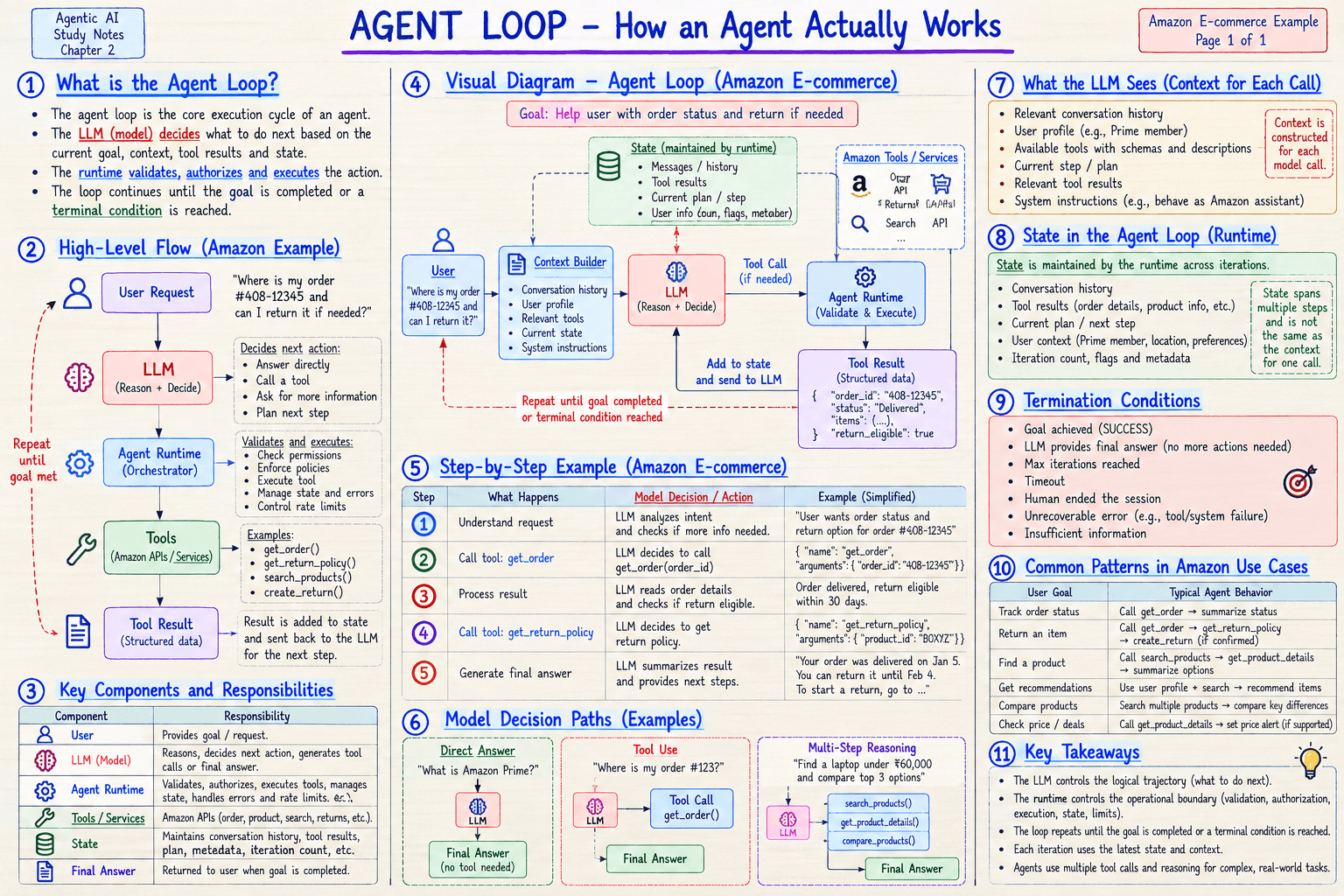
An agent is not just a model. It is two parts working together:
- The LLM decides what to do next. It reads the situation and says "call this tool with these arguments" or "I have enough to answer".
- The runtime is ordinary software around the model. It checks that the request is allowed, runs the tool, and keeps track of everything that has happened.
The model thinks. The runtime acts and keeps records. They pass the baton back and forth until the job is done.
The Launch-Day Example, Turn by Turn
The customer writes: "I got my iPhone 18 two days after launch. The box was dented and there's a thin line across the screen. I want a working phone. What should I do?"
Here is what the loop does, one turn at a time.
Turn 1: Find the order. The runtime builds the context for the model: the customer's message, who the customer is, and the list of tools it may use. The LLM decides: call get_order. The runtime checks that this customer is allowed to see this order, runs the tool, and stores the result. State now says: order found, delivered 2 days ago.
Turn 2: Check the options. The model sees the new state and decides: call get_return_policy. The runtime runs it. State now says: damaged items are eligible for return or replacement.
Turn 3: Check for a replacement. The customer wants a working phone, so the model decides to check stock. The runtime runs the stock check. The result says: no units available. State now says: replacement not possible.
Turn 4: Change course. The model reads all of it and decides there is no more tool to call. It writes the final answer: "I'm sorry about the damage. Replacement units are not available right now, so I can start a refund and arrange pickup. Shall I go ahead?"
The loop ends because the goal is met: the customer has a clear answer.
Three things to notice:
- The model never ran a tool. It only said what it wanted. The runtime ran it, after checking it was allowed.
- Every result went back to the model. The decision in Turn 3 was only possible because Turn 2's result was in the context.
- The plan changed mid-loop. The model started by looking for a way to fix the problem and ended with a refund because of what a tool returned. A fixed workflow cannot do this.
Three Things the Model Can Do Each Turn
On every pass through the loop the model picks one of three paths:
- Answer directly. "What is Amazon Prime?" needs no tool.
- Use a tool. "Where is my order?" calls
get_order. - Reason across several steps. "Find a laptop under ₹60,000 and compare the top 3" chains search, details, and compare.
The iPhone case used the third path.
When Does the Loop Stop?
A loop with no way to stop is a bug. Good agents have clear stop conditions, and the runtime enforces them, not the model:
- The goal is achieved
- The model gives a final answer
- A maximum number of iterations is reached
- A timeout hits
- A human ends the session
- An unrecoverable error occurs
- There is not enough information to continue
In the launch-day case, the missing launch offer could end in the last way: if the agent cannot find the offer details, it should stop and hand the question to a human, not guess.
🔴 CHECKPOINT: Study Notes
| Component | Responsibility |
|---|---|
| LLM | Reasons, decides the next action, writes the final answer |
| Agent runtime | Validates, authorizes, executes tools, manages state, handles errors and rate limits |
| Tools / services | The APIs that do real work |
| State | History, tool results, current plan, iteration count |
What the LLM sees on each call: the relevant conversation history, the user profile, the available tools with their schemas, the current step or plan, the relevant tool results, and the system instructions. The runtime builds this context fresh for every call.
What state holds: conversation history, tool results, the current plan and next step, user context, and the iteration count. State spans many steps, while the context is rebuilt for each call.
The LLM controls the logical trajectory. The runtime controls the operational boundary.
🛠️ From My Own Work
The same loop shows up when an assistant debugs this blog's build: read the error, form a guess, run a command, read the result, decide the next move.
The stop conditions are the part I learned to watch. In one session the build failed, I cleared the build folder, and it failed again in exactly the same way. A good loop treats a repeated identical failure as a signal. It does not try a third time. It stops, reports what it checked, and hands the problem to a human.
That is the "unrecoverable error" condition in the checkpoint. Without a rule like it, a failing build just gets retried forever.
← Previous: Agent vs Workflow · Back to the series start · Next: Tool Calling →