
Blog
Agentic AI Chapter 1: Agent vs Workflow

On this page
Part of the Agentic AI study series.
The first question is not how to build an agent. It is whether the problem needs one.
A workflow is a predefined set of steps. An agent uses an LLM to decide what to do next. Mix them up and you either over-engineer a simple job or under-power a hard one.
The easiest way to feel the difference is to stay inside one e-commerce scenario: a customer who wants to return something they bought on Amazon.
The Amazon scenarios below are illustrations I use to learn the idea. They are not a description of how Amazon's internal systems actually work.
Case 1: The Standard Return (A Workflow)
A customer pre-ordered the new iPhone 18 on launch day. It arrives, they change their mind, open their orders, and tap Return item. The reason is a simple dropdown: "No longer needed".
The system does the same thing it does for everyone:
- Validate that the order belongs to this customer
- Check that the phone is still inside its return window
- Create the return and a pickup slot
- Send a confirmation message
Every step is known in advance. The order never changes. Nobody needs a language model to decide anything, and that is a feature. This path should be fast, cheap, and identical every time.
That is a workflow. It is deterministic, predictable, and very reliable.
Case 2: The Messy Message (An Agent)
Now the same customer writes this instead:
"I got my iPhone 18 two days after launch. The box was dented and there's a thin line across the screen. The launch offer I was promised is also missing from my order. I want a working phone. What should I do?"
There is no dropdown for this. Look at what is actually inside the message:
- A possible damaged item claim
- A choice between a replacement and a return and refund, and a brand-new launch model may have little or no stock to replace from
- A missing launch offer, which is a different policy entirely
- No order number, so someone has to find the order first
You cannot draw this as a fixed flowchart, because the steps depend on what turns up along the way. An agent works like this:
- The LLM reads the message and decides the first move: find the order.
- It calls an order lookup tool and sees the phone was delivered 2 days ago.
- It checks the damage options and the return policy.
- The customer wants a working phone, so it checks whether a replacement is in stock. At launch it often is not.
- If there is no stock, it changes course: refund instead, and tell the customer why.
- It then looks into the missing launch offer separately, or asks the customer which issue to settle first.
- It repeats until the customer has a clear answer.
Notice step 5. The plan changed because of what a tool returned. A fixed flowchart cannot do that, and that is the whole point of an agent.
Here the model chooses the next step, picks the tools, and adapts to what each result says. That is an agent.
Putting Them Together
In real systems you do not choose one. You combine them.
Once the agent works out that the customer wants a return for a damaged item, it does not improvise the return itself. It hands that step to the standard returns workflow: validate, create, schedule pickup, confirm.
The agent handles the thinking. The workflow handles the doing. You get flexibility where the problem is fuzzy and reliability where the steps are known.
🔴 CHECKPOINT: Study Notes
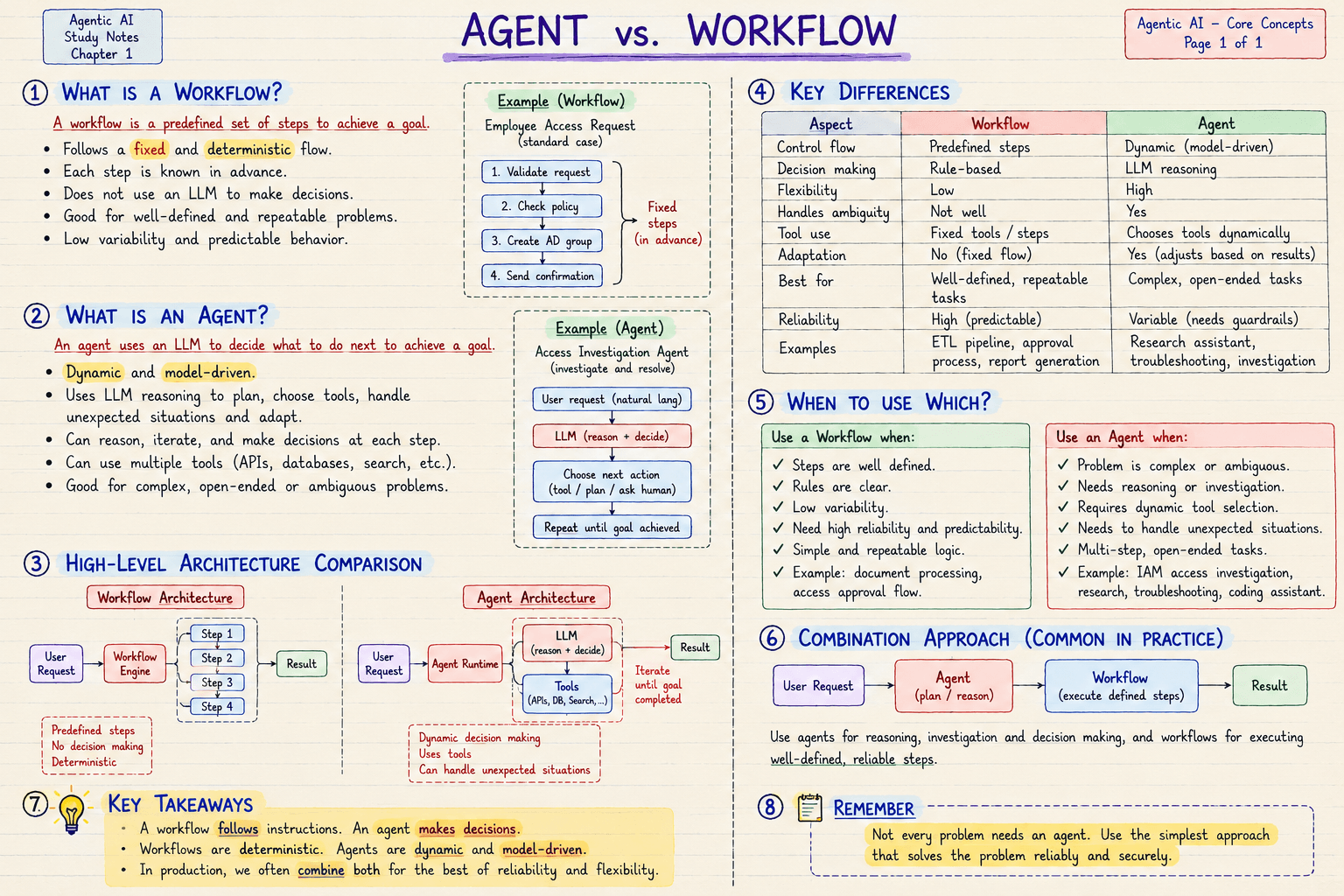
| Aspect | Workflow | Agent |
|---|---|---|
| Control flow | Predefined steps | Dynamic, model-driven |
| Handles ambiguity | Not well | Yes |
| Tool use | Fixed tools and steps | Chooses tools dynamically |
| Adaptation | No, the flow is fixed | Yes, adjusts based on results |
| Reliability | High, predictable | Variable, needs guardrails |
| Best for | Well-defined, repeatable tasks | Complex, open-ended tasks |
Use a workflow when: the steps are well defined, the rules are clear, variability is low, and you need high reliability.
Use an agent when: the problem is complex or ambiguous, it needs reasoning or investigation, it needs dynamic tool selection, and unexpected situations come up.
Not every problem needs an agent. Use the simplest approach that solves the problem reliably and securely.
🛠️ From My Own Work
This blog has a build command. Every time it runs, it does the same things in the same order: compile the pages, check the types, collect the page data, and generate the search index. That is a workflow. It never improvises, and that is why I trust it.
Then one day the build failed with this:
Error: ENOENT: no such file or directory
open '.next/routes-manifest.json'
The error says a file is missing, but none of my posts or components had changed. The build script cannot help here. It only knows how to run its own steps, and the problem sits outside them.
So I asked an assistant to find out why it was failing. Nobody could write the steps in advance, because each step depended on the last result:
- Read the error and notice it is about a missing build chunk, not about my code.
- Check whether something else is using the same output folder. In this project, the dev server and the build both write to
.next, and running them together corrupts it. - Find the dev server still running on port 3000.
- Stop it, clear the output folder, and rebuild.
- Run the build again to confirm, and only then call it fixed.
Each move came from the result of the one before. That is an agent job.
And look at the ending. Once the cause is found, the fix goes back to the workflow: the same build command, run the same way. The agent investigates, and the workflow executes.