Blog
IAM Chapter 7, Part 3: Nobody to Ask

On this page
Part of the IAM study series.
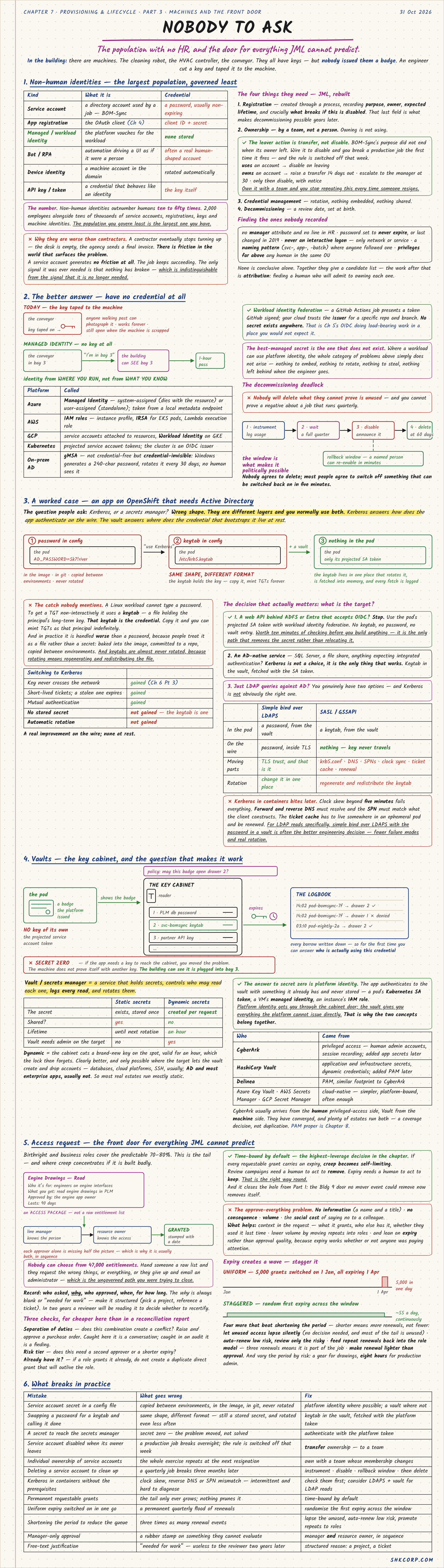
There are machines in the building: the cleaning robot, the HVAC controller, the conveyor. They all have keys, but nobody issued them a badge. An engineer cut a key and taped it to the machine.
1. Non-Human Identities
| Kind | What it is | Credential |
|---|---|---|
| Service account | A directory account used by a job, like BOM-Sync | A password, usually non-expiring |
| App registration | The OAuth client (Chapter 5) | Client ID and secret |
| Managed / workload identity | The platform vouches for the workload | None stored |
| Bot / RPA | Automation driving a UI as if it were a person | Often a real human-shaped account |
| Device identity | A machine account in the domain | Rotated automatically |
| API key / token | A credential that behaves like an identity | The key itself |
These outnumber humans ten to fifty times, so the population you govern least is the largest you have. And as Part 1 showed, nothing surfaces the problem: a service account keeps succeeding, which looks exactly like one nobody needs.
They need JML rebuilt into four things:
- Registration, recording purpose, owner, expected lifetime, and crucially what breaks if this is disabled. That last field is what makes decommissioning possible years later.
- Ownership by a team, not a person. If someone merely uses an account, disable it when they leave. If they own it, raise a transfer 14 days out, escalate to the manager at 30, and only then disable, with notice.
- Credential management: rotation, nothing embedded, nothing shared.
- Decommissioning: a review date, set at birth.
To find the ones nobody recorded, look for no manager and no HR line, passwords set to never expire or last changed in 2019, no interactive logons, naming patterns like svc- or -batch, and privileges far above any human in the same OU. None is conclusive alone. Together they give a candidate list, and the real work is finding a human who will admit to owning each one.
The decommissioning deadlock. Nobody will delete what they can't prove is unused, and you can't prove a negative about a job that runs quarterly. So instrument usage, wait a full quarter, disable with an announcement, keep a rollback window where a named person can re-enable in minutes, and delete at 60 days. Most people will agree to switch off something that can be switched back on in five minutes.
2. The Better Answer: Have No Credential at All
A key taped to a machine can be photographed, works forever, and still opens the door after the machine is scrapped. With managed identity there's no key. The conveyor says "I'm in bay 3", the building can see that it is, and it gets a one-hour pass. Identity comes from where you run, not what you know.
| Platform | Called |
|---|---|
| Azure | Managed Identity, system-assigned or user-assigned |
| AWS | IAM roles: instance profile, IRSA for EKS, Lambda execution role |
| GCP | Attached service accounts, Workload Identity on GKE |
| Kubernetes | Projected service account tokens; the cluster is an OIDC issuer |
| On-prem AD | gMSA: Windows generates a 240-char password and rotates it every 30 days |
Workload identity federation extends this: a GitHub Actions job presents a token GitHub signed, and your cloud trusts that issuer for a specific repo and branch. No secret exists anywhere. The best-managed secret is the one that doesn't exist: nothing to embed, rotate, steal, or leave behind.
3. A Worked Case: An OpenShift App That Needs AD
People ask: Kerberos, or a secrets manager? That's the wrong shape. They're different layers, and you normally use both. Kerberos answers how the app authenticates on the wire, and the vault answers where the bootstrapping credential lives at rest.
AD_PASSWORD=...in config ends up in the image, in git, and copied between environments, and is never rotated.- "Use Kerberos" gives you
/etc/krb5.keytab. Same shape, different format. - Add a vault, and there's nothing in the pod but its projected service account token. The keytab lives in one place that rotates it, is fetched into memory, and every fetch is logged.
The catch nobody mentions: a Linux workload can't type a password, so it gets a TGT using a keytab, a file holding the principal's long-term key. That keytab is the credential. Copy it and you can mint TGTs as that principal indefinitely. In practice it's handled worse than a password, because people treat it as a file, and it's almost never rotated. Switching to Kerberos is a real improvement on the wire and none at rest.
The decision that actually matters is what the target is:
- A web API behind ADFS or Entra that accepts OIDC? Stop, and use workload identity federation. It's the only path that removes the secret rather than relocating it.
- An AD-native service, like SQL Server or a file share? Kerberos is the only thing that works. Keep the keytab in the vault.
- Just LDAP queries against AD? You have two genuine options:
| Simple bind over LDAPS | SASL / GSSAPI | |
|---|---|---|
| In the pod | A password, from the vault | A keytab, from the vault |
| On the wire | Password, inside TLS | Nothing; the key never travels |
| Moving parts | TLS trust | krb5.conf, DNS, SPNs, clock sync, ticket cache |
| Rotation | Change it in one place | Regenerate and redistribute the keytab |
Kerberos in containers bites later: clock skew over five minutes fails everything, forward and reverse DNS must resolve, and the ticket cache must live somewhere in an ephemeral pod. For LDAP reads, simple bind over LDAPS with the password in a vault is often the better engineering decision.
4. Vaults: The Key Cabinet
A vault (or secrets manager) holds secrets, controls who may read each one, logs every read, and rotates them. The logbook means that, for the first time, you can answer who is actually using a credential.
The question that makes it work is secret zero: if the app needs a key to reach the cabinet, you've only moved the problem. The answer is platform identity. The app authenticates with something it already has and never stored, such as a pod's service account token, a VM's managed identity, or an instance's IAM role. Platform identity gets you through the cabinet door, and the vault gives you everything the platform can't issue directly.
| Static secrets | Dynamic secrets | |
|---|---|---|
| The secret | Exists, stored once | Created per request |
| Shared? | Yes | No |
| Lifetime | Until next rotation | An hour |
| Vault needs admin on target | No | Yes |
Dynamic is clearly better, but only works where the target lets the vault create and drop accounts: usually databases, cloud platforms, and SSH, but usually not AD and most enterprise apps. So most real estates run mostly static.
On products, CyberArk usually arrives from the human privileged-access side and HashiCorp Vault from the machine side. They've converged, and plenty of estates run both. Delinea is similar to CyberArk, and the cloud-native managers (Azure Key Vault, AWS Secrets Manager, GCP Secret Manager) are simpler, platform-bound, and often enough.
5. Access Requests: The Front Door
Birthright and business roles cover the predictable 70–80%. This is the tail, where creep concentrates if it's built badly.
Nobody can choose from 47,000 entitlements. Hand someone a raw list and they'll request everything, or give up and email an admin, which is the ungoverned path you were trying to close. Offer an access package instead: "Engine Drawings – Read", with who it's for, what you get, who approves, and how long it lasts. Approval usually goes to the line manager, who knows the person, then the resource owner, who knows the access.
Record who asked, why, who approved, when, and for how long. The why is always blank or "needed for work", so make it structured: pick a project or reference a ticket. Three checks are far cheaper here than in a reconciliation report:
- Separation of duties: does this combination create a conflict? Caught here it's a conversation; caught in an audit it's a finding.
- Risk tier: does this need a second approver or a shorter expiry?
- Already have it? If a role grants it, don't create a duplicate grant that will outlive the role.
Time-bound by default
This is the highest-leverage decision in the chapter. If every requestable grant carries an expiry, creep becomes self-limiting. Review campaigns need a human to act to remove access, while expiry needs a human to act to keep it. That's the right way round, and it closes the hole from Part 1: the engine archive door no mover event could remove now removes itself.
Approvers will still approve everything, because they have little information, no consequence, too much volume, and a social cost to saying no. Add context to the request (what it grants, who else has it, whether they used it last time), move repeats into roles, and lean on expiry, which works whether or not anyone was paying attention.
Expiry also creates a wave. Switch on 5,000 grants on 1 January, all expiring 1 April, and you get 5,000 renewals in one day. Randomise the first expiry across the window and it's about 55 a day, continuously.
Don't shorten the period to reduce the queue, because shorter means more renewals. Instead, let unused access lapse silently, auto-renew low risk, feed repeat renewals back into the role model, and make renewal lighter than approval. Vary the period by risk: a year for drawings, eight hours for production admin.
What Breaks in Practice
| Mistake | What goes wrong | Fix |
|---|---|---|
| Service account secret in a config file | In the image, in git, never rotated | Platform identity, or a vault where not |
| Swapping a password for a keytab | Still a stored secret, rotated even less | Keytab in the vault |
| A secret to reach the secrets manager | Secret zero: the problem moved | Authenticate with the platform token |
| Service account disabled when its owner leaves | A production job breaks overnight | Transfer ownership to a team |
| Deleting a service account to clean up | A quarterly job breaks three months later | Instrument, disable, rollback window, delete |
| Kerberos in containers without prerequisites | Intermittent, hard-to-diagnose failures | Check them first; consider LDAPS plus a vault |
| Permanent requestable grants | The tail only ever grows | Time-bound by default |
| Uniform expiry switched on in one go | A permanent quarterly flood of renewals | Randomise the first expiry |
| Manager-only approval | A rubber stamp on what they can't evaluate | Manager and resource owner, in sequence |
| Free-text justification | "Needed for work" is useless later | A structured reason: a project, a ticket |