
Blog
IAM Chapter 5: OAuth 2.0, Part 1
On this page
Part of the IAM study series.
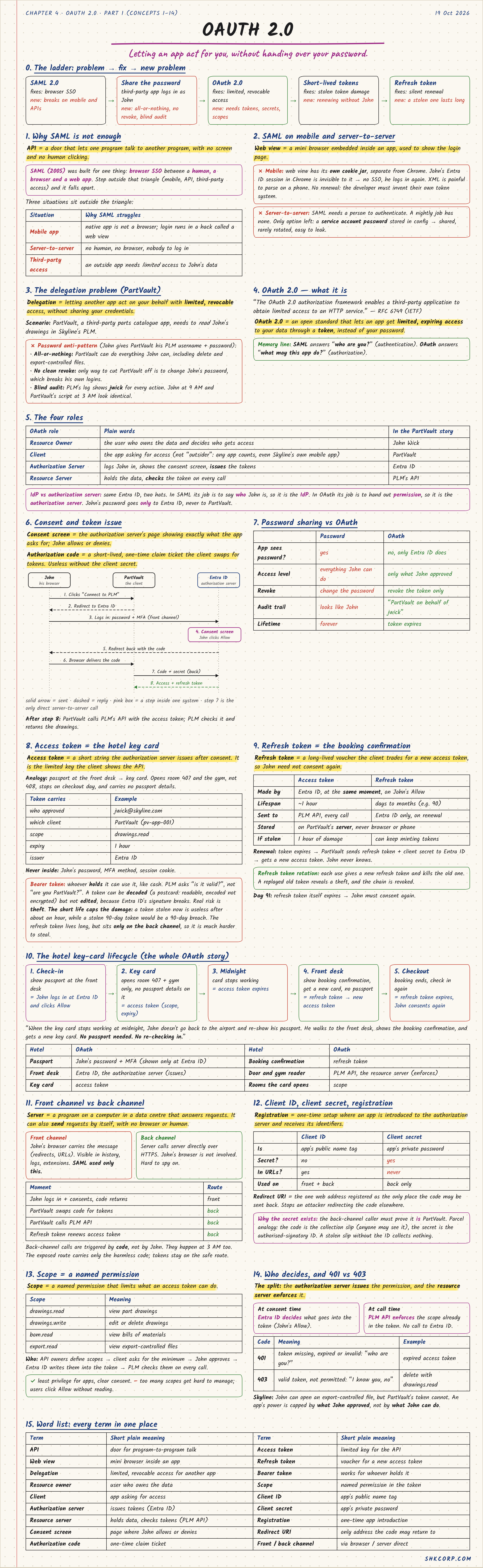
Chapter 4 ended with where SAML breaks: mobile apps, machine-to-machine APIs, and verbose XML. OAuth 2.0 is the fix, and it exists to solve a problem SAML was never built for: delegation — letting another app act on your behalf with limited, revocable access, without sharing your credentials.
Why SAML Isn't Enough Here
SAML (2005) was built for one thing: browser SSO between a human, a browser, and a web app. Three situations sit outside that triangle:
- Mobile app — a native app isn't a browser; logging in means a hacked-together web view, no SSO, no reuse of the real browser's session.
- Server-to-server — no human, no browser, nobody to log in. SAML needs a person to authenticate.
- Third-party access — an outside app needs limited access to John's data, not full impersonation.
The Delegation Problem
Scenario: PartVault, a third-party parts catalogue app, wants to read John's part drawings in PLM — not become John.
The anti-pattern is password sharing: John gives PartVault his PLM username and password directly. That's all-or-nothing — PartVault can do everything John can, including delete and export-controlled files. There's no clean revoke — the only way to cut PartVault off is changing John's own password, which breaks his own logins too. And the audit trail is useless — PLM's logs show jwick for every action, whether it was John at 9am or PartVault's script at 3am; they look identical.
OAuth 2.0 is an open authorization framework (RFC 6749) that lets an app get limited, expiring access to your data through a token, instead of your password. One memory line: SAML answers "who are you?" (authentication). OAuth answers "what may this app do?" (authorization).
The Four Roles
| OAuth role | Plain words | In the PartVault story |
|---|---|---|
| Resource Owner | the user who owns the data | John Wick |
| Client | the app asking for access | PartVault |
| Authorization Server | logs John in, shows consent, issues tokens | Entra ID |
| Resource Server | holds the data, checks the token | PLM's API |
Same Entra ID, two hats. In SAML, its job is to say who John is, so it's the IdP. In OAuth, its job is to hand out permission, so it's the authorization server.
The Flow: John Connects PartVault to PLM
Registration happens once, long before John clicks anything: PartVault is registered with Entra ID and gets a client ID (public) and a client secret (private, stays on PartVault's server). Its redirect URI is on file — the only address an authorization code may be sent back to. PLM's API defines scopes like drawings.read.
- John clicks "Connect to PLM" on PartVault's page.
- PartVault redirects John's browser to Entra ID, carrying
client_id,scope=drawings.read,redirect_uri, andresponse_type=code. Nothing secret is in this address — that's why it's safe to send through the browser. - John logs in at Entra ID with password and MFA, on Entra ID's own page. PartVault never sees the password.
- Entra ID shows the consent screen: "PartVault wants to: read your part drawings" — and makes clear what it can't do (delete, access export-controlled files). John clicks Allow.
- Entra ID redirects back to PartVault's redirect URI with a one-time authorization code — short-lived, single-use.
- PartVault's server calls Entra ID directly, server-to-server, no browser: code + client ID + client secret + redirect URI. John just sees a loading spinner.
- Entra ID verifies all four and replies with an access token (about 1 hour, scoped to
drawings.read) and a refresh token (about 90 days). - PartVault calls PLM's API with the access token attached.
- PLM's API checks the token — signature valid, not expired, scope covers a read — and returns the drawings.
- Later, when the access token expires, PartVault trades the refresh token for a new one. John never knows, until the refresh token itself expires and he has to consent again.
Why the flow is split in two: steps 1–5 go through John's browser — anything the browser carries can leak through history, logs, and extensions, so the only thing that travels there is the authorization code, which is useless on its own. Steps 6–10 happen server-to-server — the client secret, access token, and refresh token never touch the browser.
Access Token as a Hotel Key Card
The analogy that makes the tokens click: an access token is a hotel key card. It carries who approved it, which client, which scope, when it expires, and who issued it — but it is never the passport (John's password), the front desk's authority (MFA), or the booking (session) itself. Whoever holds the card can use it — it's a bearer token, not individually verified against John each time. Stolen, it causes about an hour of damage before it expires.
A refresh token is the booking confirmation — the longer-lived voucher that gets you a new key card without re-showing your passport. Stolen, it can keep minting tokens for much longer, which is why it's sent only over the back channel and never the browser, and why refresh token rotation matters: each use issues a new refresh token and kills the old one, so a replayed old token signals a theft and the whole chain gets revoked.
"When the key card stops working at midnight, John doesn't go back to the airport and re-show his passport. He walks to the front desk, shows the booking confirmation, gets a new card. No passport needed, no re-checking."
Front Channel vs. Back Channel
The front channel is anything the browser carries — visible in history, logs, browser extensions. SAML used only this. The back channel is server-to-server, invisible to the browser, hard to spy on.
| Moment | Route |
|---|---|
| John logs in + consents, code returns | front |
| PartVault swaps the code for tokens | back |
| PartVault calls PLM's API | back |
| Refresh token renews the access token | back |
What If the Code Is Stolen?
Scenario: a malicious browser extension on John's laptop copies the authorization code at step 5.
- The attacker has the code and the client ID — both were visible in the address.
- They send the code to Entra ID's token endpoint, hoping for tokens.
- Entra ID demands the client secret. The attacker doesn't have it — it lives only on PartVault's server.
- Entra ID rejects the request. The code is also single-use, expires in minutes, and is bound to PartVault's registered redirect URI.
This protection only exists for confidential clients — ones that can keep a secret, like PartVault's server. A mobile app can't hide a secret, which is why it needs an extra safeguard called PKCE — the next concept, for part 2.
🔴 CHECKPOINT: Study Notes
| Term | One line |
|---|---|
| Delegation | letting another app act on your behalf with limited, revocable access |
| Authorization code | one-time claim ticket, useless without the client secret |
| Client secret | why the code is safe to expose — lives only on the server |
| Access token | the hotel key card — limited key, short-lived, bearer |
| Refresh token | the booking confirmation — gets a new key card without re-showing your passport |
| Front / back channel | browser-visible vs. server-to-server |