
Blog
IAM Chapter 5: OAuth 2.0, Part 2
On this page
Part of the IAM study series.
Part 1 ended with a problem: PartVault can keep a client secret, because it runs on a server Skyline doesn't see but PartVault controls. The PLM mobile app cannot — anyone can unpack the app and read whatever's inside it. If an attacker steals the authorization code, there's nothing left to check, and the attacker gets the tokens. This chapter fixes that gap.
PKCE, in Two Parts
PKCE (Proof Key for Code Exchange, said "pixie," RFC 7636) replaces the stored secret with a fresh, one-time proof invented at the start of each login. Split into two diagrams so each half stays readable.
Part 1: Login
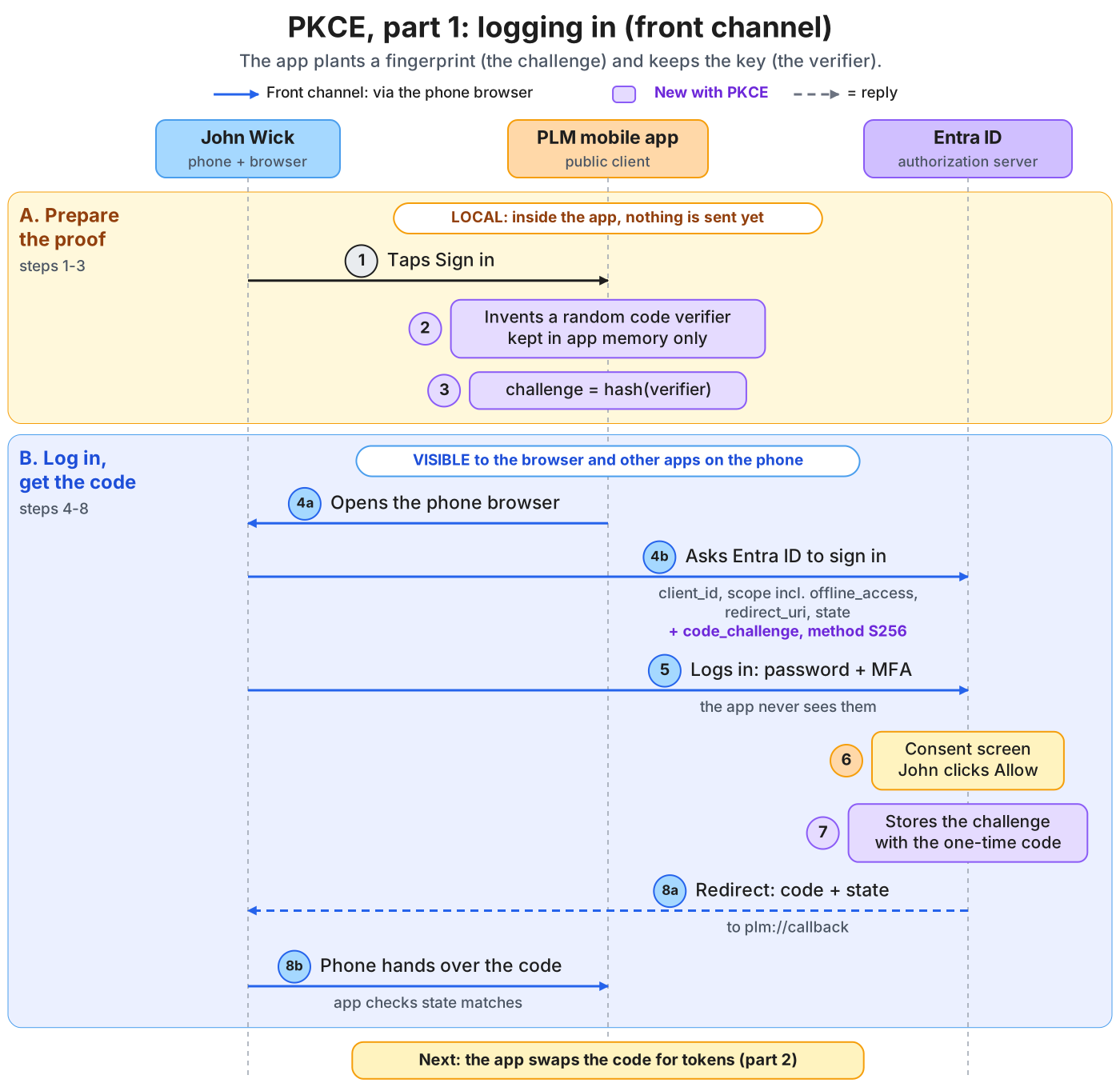
PKCE, part 1. The app invents a secret verifier, sends only its hash (the challenge) at the start, and Entra ID stores that challenge with the one-time code.
John taps Sign in (1). The app invents a random code verifier and keeps it in memory only (2), then computes the code challenge as its hash (3). The app opens the phone's browser (4a), which asks Entra ID to sign in, sending client_id, scope, redirect_uri, state, and the code_challenge with method S256 (4b). John logs in with password and MFA (5) and approves the consent screen (6). Entra ID stores the challenge with the one-time code (7) and redirects to plm://callback with the code and state (8a). The phone hands the code to the app, which checks that state matches (8b). Everything from step 4 onward is visible to the browser and other apps on the phone, but the verifier has never left the app.
Part 2: Finishing the Login, and Renewing Later
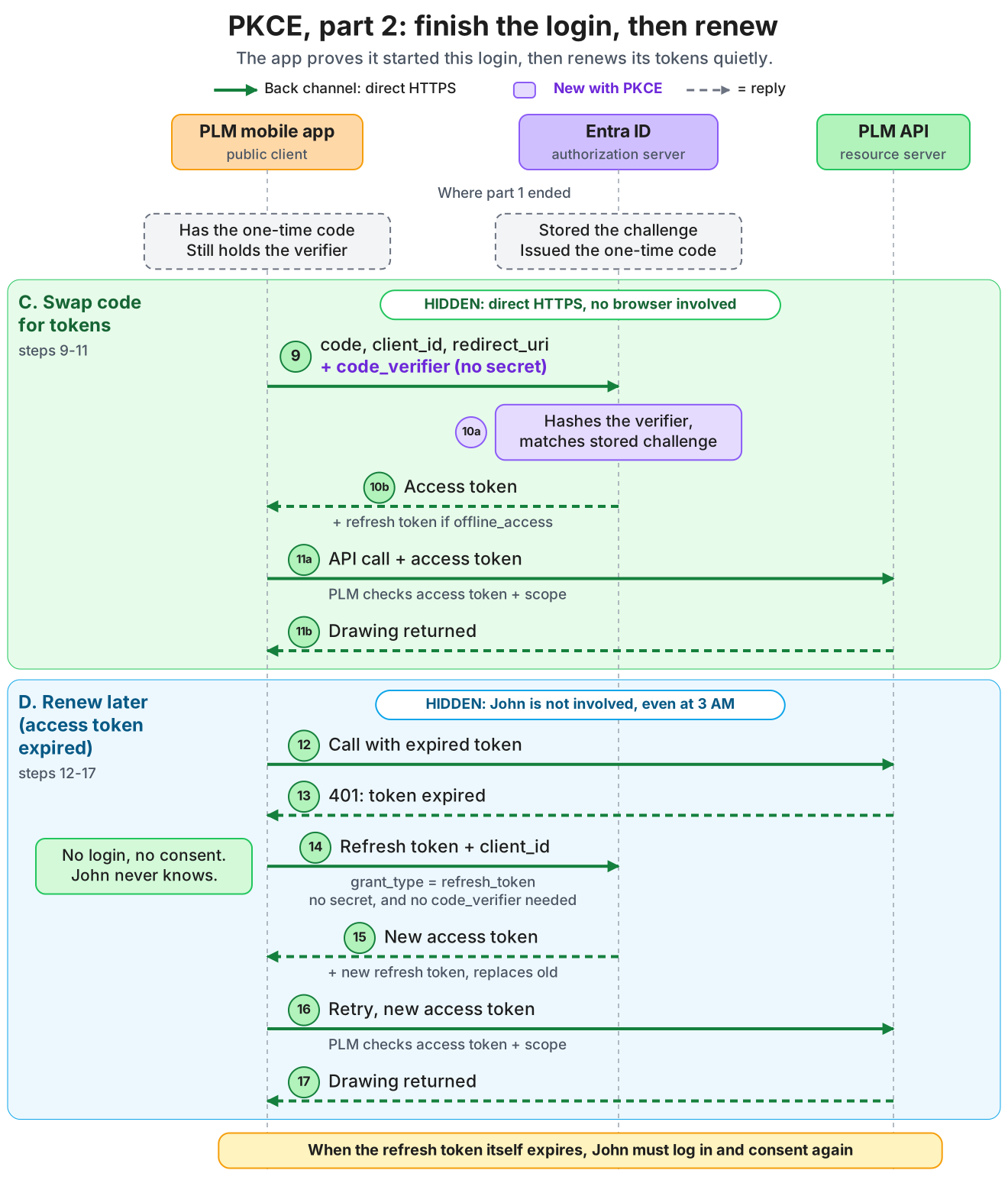
PKCE, part 2. The app reveals the verifier over the back channel; Entra ID hashes it and compares it with the stored challenge before issuing tokens. Later the app renews an expired access token with the refresh token.
The app sends the code, client_id, redirect_uri, and the original code_verifier directly to Entra ID. It sends no client secret, because it has none (9). Entra ID hashes the verifier and checks that it matches the stored challenge (10a). On a match it returns an access token, plus a refresh token if offline_access was requested (10b). The app calls the PLM API with the access token (11a) and receives the drawing (11b). A malicious app that stole the code would fail at step 10a, because it never knew the verifier and a hash cannot be reversed.
Later, when the access token expires, PLM answers 401 (13). The app sends the refresh token and client_id with grant_type=refresh_token, with no secret and no code_verifier (14), and receives a new access token plus a new refresh token that replaces the old one (15), without John being involved. It retries the call (16) and receives the drawing (17). When the refresh token itself expires, John must log in and consent again.
Why a New Verifier Every Login?
A fixed verifier built into the app would sit in the package, readable and reusable forever — the original problem again. A fresh verifier lives only in memory for a few minutes.
| Client secret | PKCE verifier | |
|---|---|---|
| Created | Once, at registration | Fresh every login |
| Lives | On a server, long-term | In app memory, for minutes |
| In the app package? | No (server only) | Never |
| For | Confidential clients | Public clients (and any client) |
Pros: no secret to hide in an app anyone can download; a fresh proof every login; a stolen code is worthless. Cons: it ties the end of one login to its start, but it doesn't prove which app you are — anyone can still claim the public client ID. Today: RFC 9700 (OAuth security best practice) requires PKCE for public clients and recommends it for confidential ones too.
The Full Flow, One Picture
Everything above, combined — steps 1–3 prepare the verifier and challenge inside the app, steps 4–8 log in through the browser, steps 9–11 swap the code and verifier for tokens and call the API, and steps 12–17 renew an expired access token with the refresh token.
The image is tall (about 2500px) — on a phone it needs pinch-zoom, or use the "view full size" control on the image to open it at native resolution in a new tab.
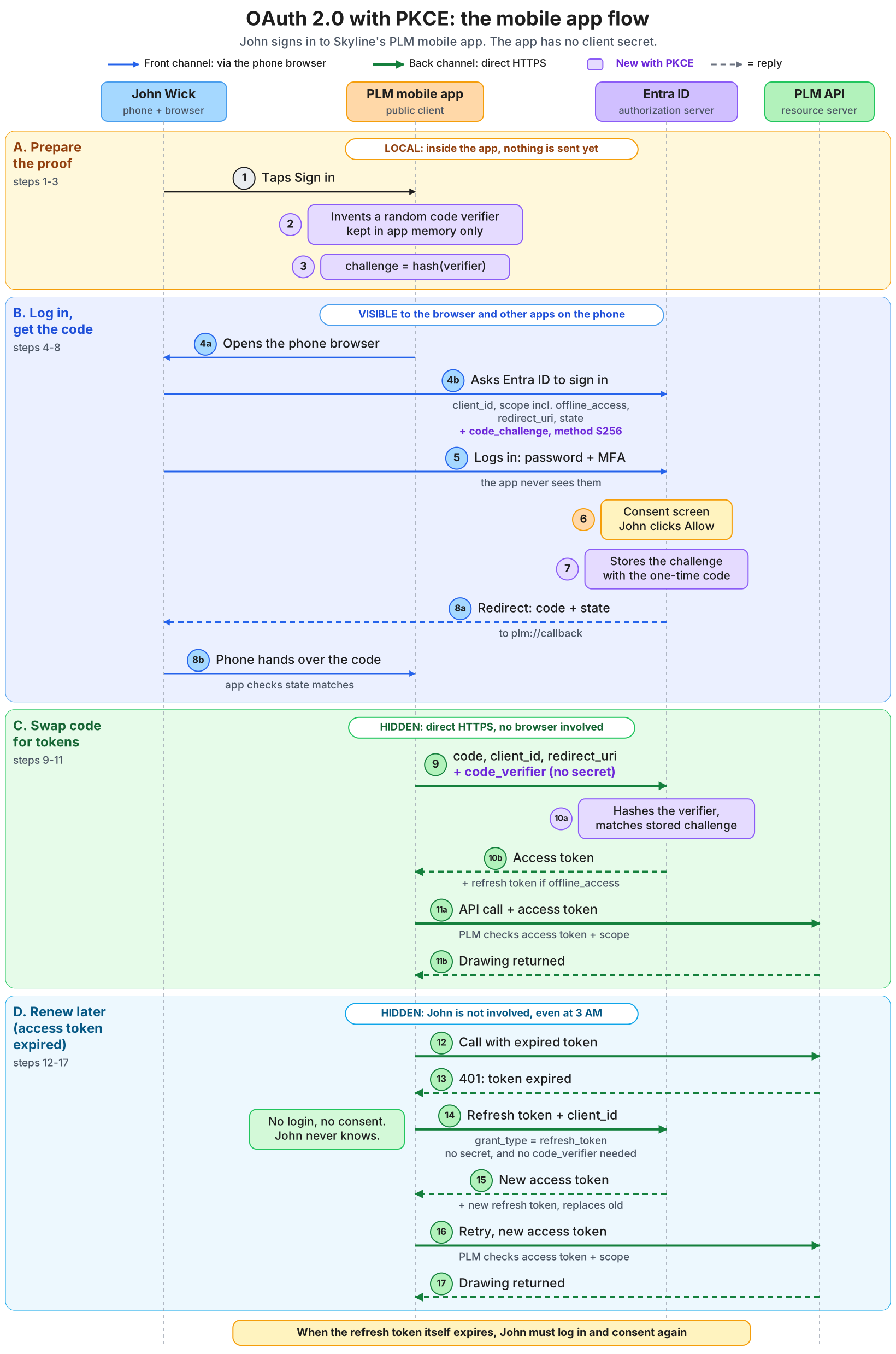
The full OAuth 2.0 with PKCE flow for a mobile app, in one picture. Purple marks everything that is new compared with the flow without PKCE.
🔴 CHECKPOINT: Study Notes

Sources: RFC 6749 (The OAuth 2.0 Authorization Framework), RFC 7636 (Proof Key for Code Exchange), RFC 9700 (OAuth 2.0 Security Best Current Practice).