
Blog
IAM Chapter 3: Authentication & MFA
On this page
Part of the IAM study series.
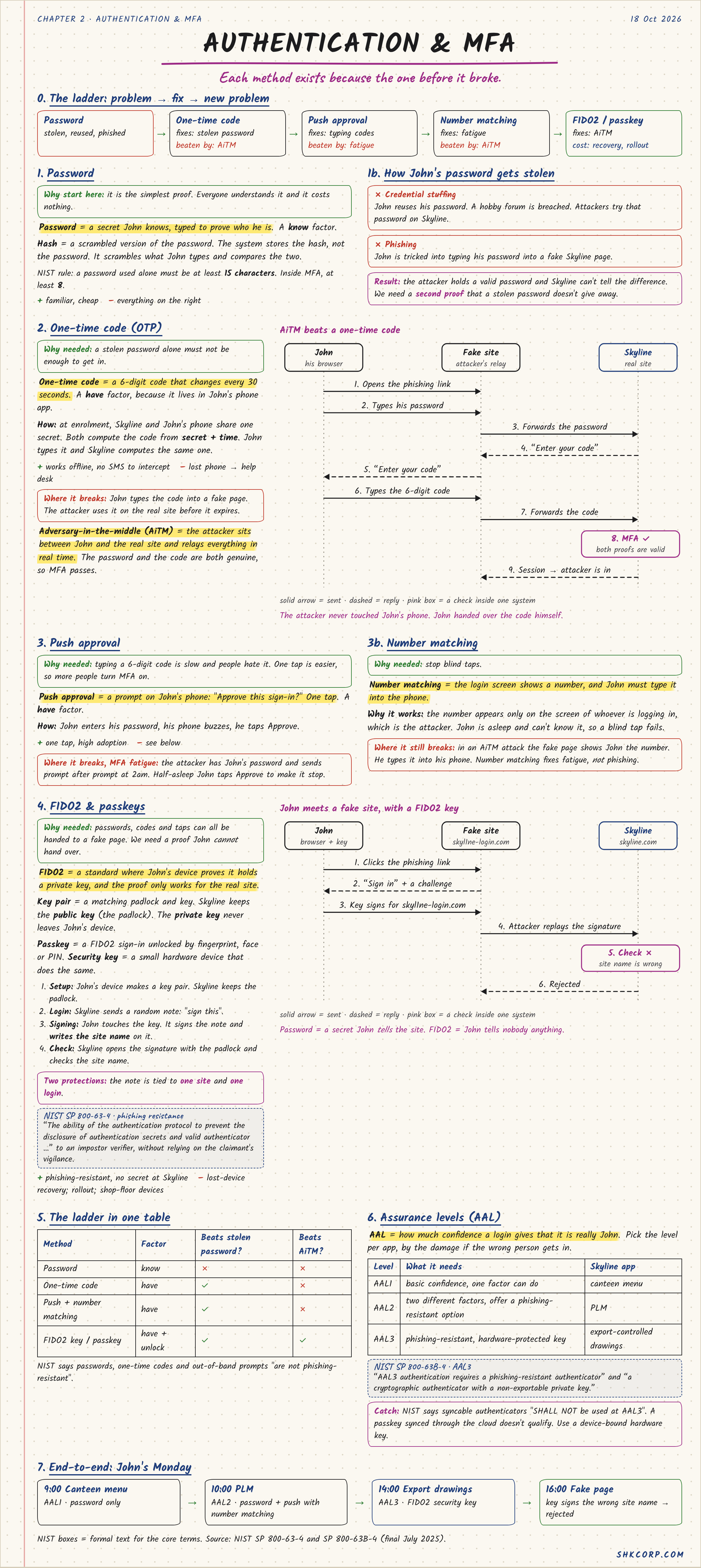
Each authentication method in this chapter exists because the one before it broke. That's the thread to follow — not a list of acronyms, but a ladder: problem, fix, new problem, next fix.
Password → fixed by one-time code → fixed by push approval → fixed by number matching → fixed by FIDO2 / passkeys.
1. Password
A password is a secret John knows, typed to prove who he is — a know factor. The system never stores the password itself, only a hash, a scrambled version it compares against. NIST's current rule: a password used alone should be at least 15 characters; inside MFA, at least 8.
Cheap and familiar, which is why it's still step one everywhere. But it breaks in two common ways:
- Credential stuffing — John reuses his password, a hobby forum gets breached, attackers try that password on Skyline's login.
- Phishing — John is tricked into typing his password into a fake Skyline page.
Either way, the attacker now holds a valid password, and Skyline can't tell the difference. That's why a stolen password alone must not be enough to get in — hence a second proof.
2. One-Time Code (OTP)
A one-time code is a 6-digit code that changes every 30 seconds — a have factor, because it lives in John's phone app. At enrollment, Skyline and John's phone share one secret; both compute the code from secret + time.
It works offline and there's no SMS to intercept, but it breaks under adversary-in-the-middle (AiTM): the attacker sits between John and the real site and relays everything in real time.
- John opens a phishing link. The fake site looks real.
- He types his password — the fake site forwards it to the real one.
- The real site asks for his code. The fake site relays that prompt to John.
- John types the 6-digit code into the fake page. The fake site forwards it immediately, before it expires.
- Both proofs are valid. MFA passes — the attacker is in.
The attacker never touched John's phone. John handed over the code himself, just one hop removed. AiTM beats a one-time code, because the code is still something John can be tricked into typing somewhere.
3. Push Approval and Number Matching
Push approval is a prompt on John's phone — "Approve this sign-in?" — one tap, a have factor. Easier than typing a code, so adoption goes up. But it opens MFA fatigue: the attacker has John's password and sends the prompt at 2am, hoping half-asleep John taps Approve just to make the buzzing stop.
Number matching fixes that specific failure: the login screen shows a number, and John must type it into his phone. The number appears only on the screen of whoever is actually logging in — which, if it's not John, he can't see. A blind tap can no longer work.
It still breaks in a live AiTM attack, though — the fake page itself can show John the number, and he types it in without knowing he's relaying it. Number matching fixes fatigue, not phishing.
4. FIDO2 and Passkeys
Passwords, codes, and taps can all be typed or tapped into a fake page. FIDO2 is a standard where John's device proves it holds a private key, and the proof only works for the real site.
A key pair is a matching lock and key. Skyline keeps the public key (the lock); the private key never leaves John's device. A passkey is a FIDO2 sign-in unlocked by fingerprint, face, or PIN; a security key is a small hardware device that does the same thing.
- Setup — John's device generates a key pair. Skyline keeps the public key.
- Login — Skyline sends a random challenge: "sign this."
- Signing — John touches the key. It signs the challenge and writes the site's own name into the signature.
- Check — Skyline verifies the signature with the public key, and confirms the site name matches.
That last step is the whole defense. If John lands on skylline-login.com (one letter off) and his key tries to sign in, the signature gets tied to the wrong site name — Skyline's real check rejects it on sight. NIST calls this phishing resistance: "the ability of the authentication protocol to prevent the disclosure of authentication secrets and valid authenticator outputs to an impostor verifier, without relying on the claimant's vigilance." John doesn't have to notice anything is wrong. The protocol notices for him.
Password = a secret John tells the site. FIDO2 = John tells nobody anything.
5. Picking the Level: AAL
AAL (Authenticator Assurance Level) is how much confidence a login gives that it's really John — picked per app, based on the damage if the wrong person gets in.
| Level | What it needs | Skyline app |
|---|---|---|
| AAL1 | basic confidence, one factor | canteen menu |
| AAL2 | two different factors, or a phishing-resistant option | PLM |
| AAL3 | phishing-resistant, hardware-protected key | export-controlled drawings |
NIST SP 800-63B-4 is blunt about AAL3: it requires a phishing-resistant authenticator with a cryptographic, non-exportable private key — and it specifically disallows syncable authenticators ("SHALL NOT be used at AAL3"). A passkey synced through the cloud doesn't qualify there; it has to be a device-bound hardware key.
John's Monday, by assurance level
9:00 canteen menu (AAL1, password only) → 10:00 PLM (AAL2, password + push with number matching) → 14:00 export drawings (AAL3, FIDO2 security key) → 16:00 a fake page tries to sign in with his key, signs the wrong site name, and is rejected.
🔴 CHECKPOINT: Study Notes
| Method | Factor | Beats stolen password? | Beats AiTM? |
|---|---|---|---|
| Password | know | ✗ | ✗ |
| One-time code | have | ✓ | ✗ |
| Push + number matching | have | ✓ | ✗ |
| FIDO2 key / passkey | have + unlock | ✓ | ✓ |
NIST says passwords, one-time codes, and out-of-band prompts "are not phishing-resistant."
← Previous: Authorization, IdP & Directories · Back to the series start · Next: SAML 2.0 & SSO →