
Blog
IAM Chapter 2: Authorization, IdP & Directories
On this page
Part of the IAM study series.
Chapter 1 got John Wick logged in. Being authenticated answers who are you. It says nothing about what can you do — that's authorization, and it's a separate layer with its own failure modes.
Authorization (AuthZ)
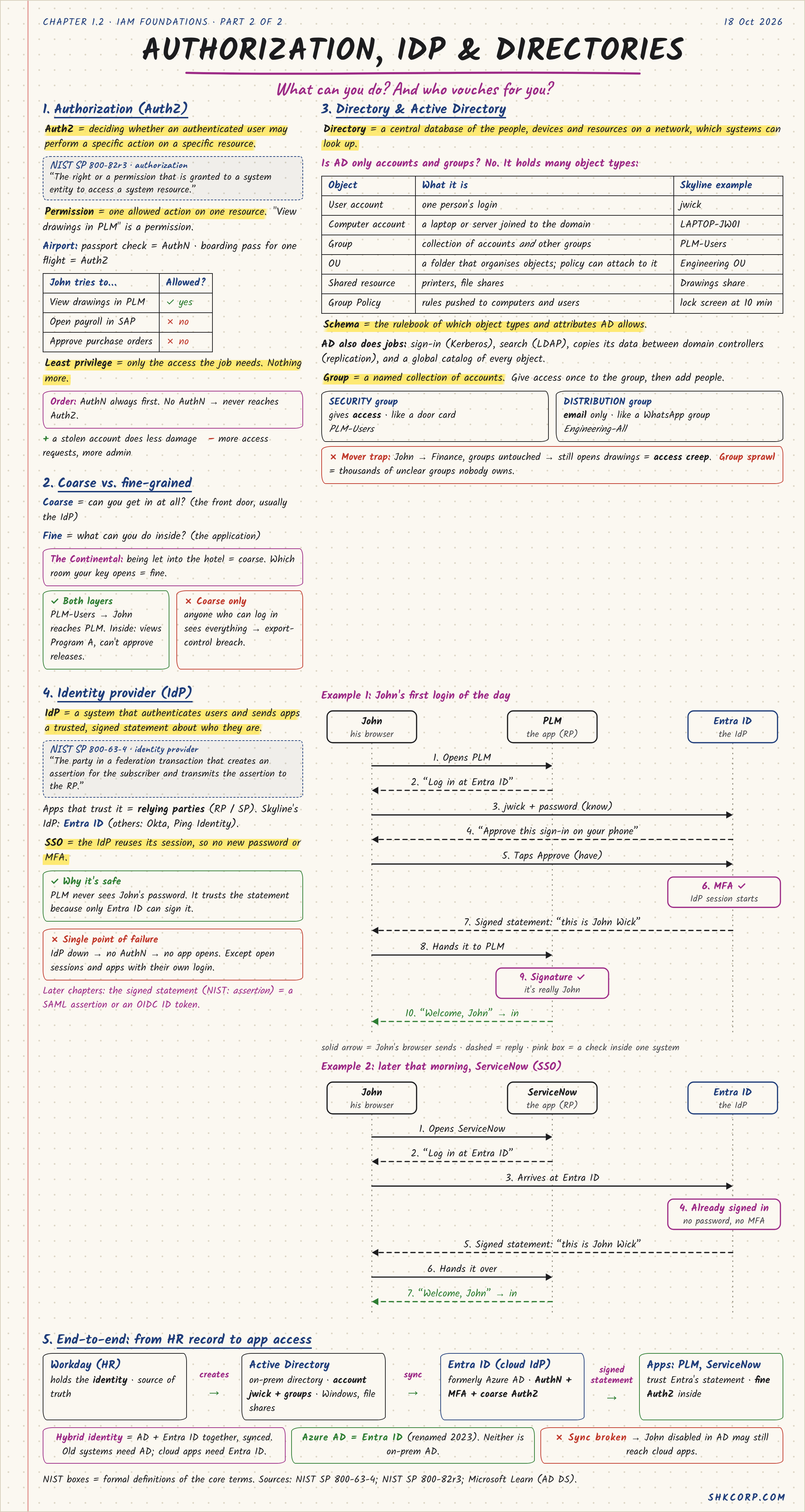
Authorization is deciding whether an authenticated user may perform a specific action on a specific resource. NIST SP 800-82r3: "the right or permission that is granted to a system entity to access a system resource."
A permission is one allowed action on one resource — "view drawings in PLM" is a permission. The airport analogy makes the order clear: the passport check is AuthN, the boarding pass for one specific flight is AuthZ. You always check the passport first. No AuthN never reaches AuthZ.
Least privilege means only the access the job needs, nothing more. John can view drawings in PLM (yes), but can't open payroll in SAP or approve purchase orders (no). A stolen account under least privilege does less damage — fewer standing permissions to abuse.
Coarse vs. Fine-Grained
Coarse-grained authorization is "can you get in at all" — usually decided at the IdP, the front door. Fine-grained is "what can you do once inside" — decided by the application.
The hotel analogy: being let into the building is coarse. Which room your key opens is fine. Both layers matter — PLM group membership gets John through the front door, but inside PLM he can view Program A's drawings and still can't approve a release. Stop at coarse-only and anyone who can log in sees everything — an export-control breach waiting to happen.
Directories and Active Directory
A directory is a central database of the people, devices, and resources on a network that systems can look up. It's not just accounts and groups — AD holds several object types:
| Object | What it is | Skyline example |
|---|---|---|
| User account | one person's login | jwick |
| Computer account | a device joined to the domain | LAPTOP-JW01 |
| Group | a collection of accounts and other groups | PLM-Users |
| OU | a folder that organizes objects, policy attaches here | Engineering OU |
| Shared resource | printers, file shares | Drawings share |
| Group Policy | rules pushed to computers and users | lock screen at 10 min |
The schema is the rulebook of which object types and attributes AD allows. Beyond storing data, AD does real jobs: sign-in (Kerberos), search (LDAP), and replicating its data between domain controllers.
A group is a named collection of accounts — give access once to the group, then add people, instead of granting access person by person. A security group gives access, like a door card. A distribution group is email-only, like a mailing list — it grants nothing.
Group sprawl is the trap: John moves from Engineering to Finance, but nobody removes his old group memberships. He still opens drawings he shouldn't. Multiply that by thousands of unclear groups nobody owns, and that's access creep at scale.
Identity Provider (IdP) and SSO
An identity provider (IdP) is a system that authenticates users and sends apps a trusted, signed statement about who they are. NIST: "the party in a federation transaction that creates an assertion for the subscriber and transmits the assertion to the RP." Apps that trust it are relying parties (RP / SP). Skyline's IdP is Entra ID.
SSO means the IdP reuses its session, so no new password or MFA is needed for the next app. PLM never sees John's password — it trusts the signed statement because only Entra ID can sign it.
John's first login of the day (SP-initiated, simplified)
- John opens PLM. PLM says: "log in at Entra ID."
- John enters
jwick+ password (know), approves on his phone (have). - MFA check passes — the IdP session starts.
- Entra ID sends PLM a signed statement: "this is John Wick."
- PLM verifies the signature and lets him in.
Later that morning, ServiceNow (SSO)
- John opens ServiceNow. It redirects to Entra ID.
- Entra ID sees he's already signed in — no password, no MFA.
- It sends ServiceNow a fresh signed statement. He's in.
That signed statement is what later chapters open up properly — a SAML assertion or an OIDC ID token.
The trade-off: SSO is safer in one real sense (PLM never handles John's password) and riskier in another — the IdP becomes a single point of failure. IdP down means no AuthN, means no app opens, except already-open sessions and the rare app with its own separate login.
🔴 CHECKPOINT: Study Notes
| Term | One line |
|---|---|
| AuthZ | deciding what an authenticated user may do |
| Permission | one allowed action on one resource |
| Coarse-grained | can you get in at all (usually the IdP) |
| Fine-grained | what can you do once inside (the app) |
| Directory | central database of people, devices, resources |
| Group sprawl / access creep | stale group memberships nobody owns |
| IdP | authenticates users, issues a signed statement apps trust |
| SSO | the IdP reuses its session — one login, many apps |
← Previous: Identity & Authentication · Back to the series start · Next: Authentication & MFA →