
Blog
Agentic AI Chapter 5: Tool Execution, Response Handling and Observability
Part of the Agentic AI study series.
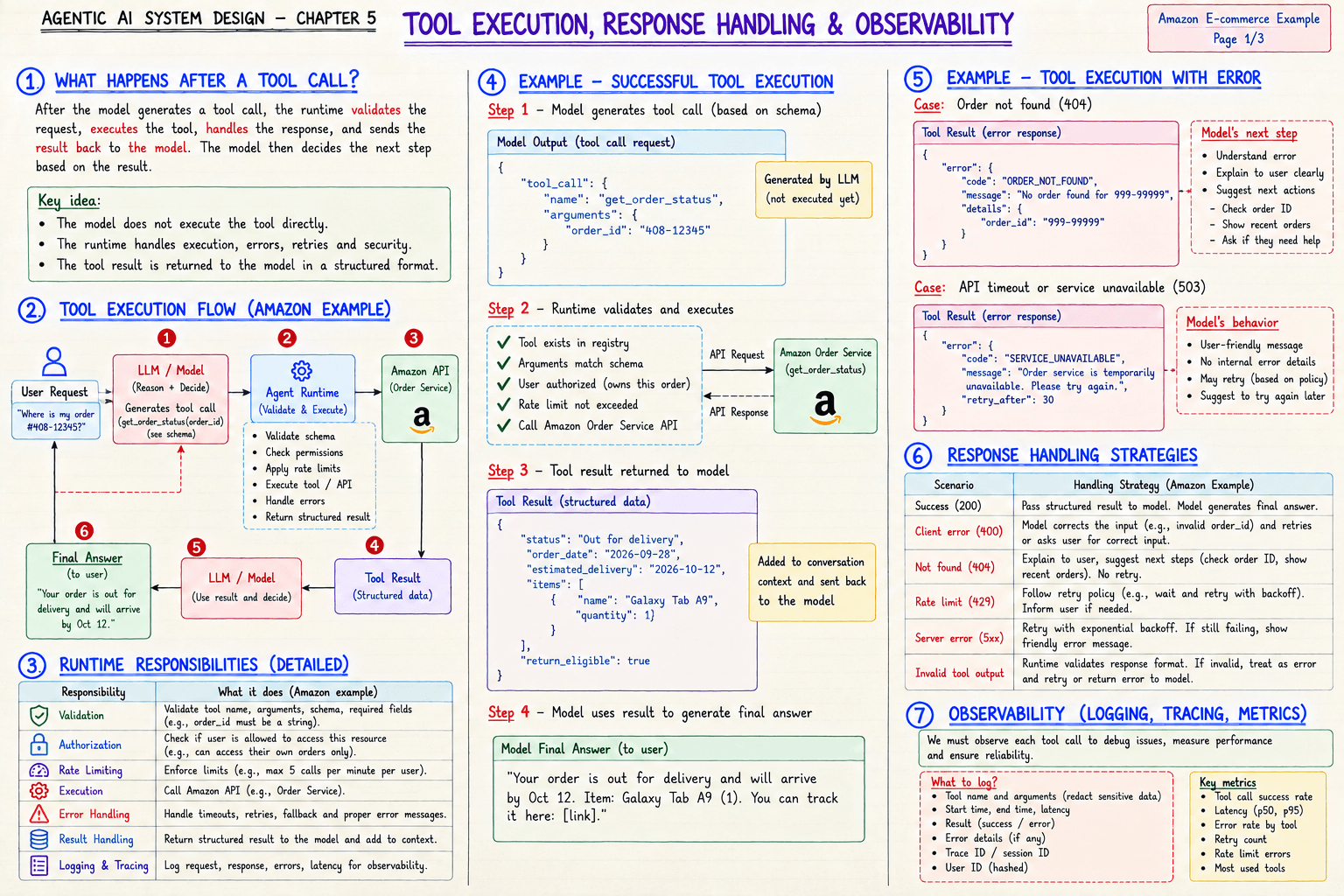
After the model generates a tool call, the runtime does the real work: validate the request, execute the tool, handle the response, and send the result back to the model. The model then decides the next step.
📊 Real-World Example: When the Tool Fails
Order not found (404). The model understands the error, explains it clearly to the user, and suggests next steps: check the order ID, show recent orders, or offer help. No retry.
Service unavailable (503). The model gives a friendly message with no internal details, may retry based on policy, and suggests trying again later.
🔴 CHECKPOINT: Remember
What the runtime is responsible for: validation, authorization, rate limiting, execution, error handling, result handling, and logging and tracing.
| Scenario | Handling strategy |
|---|---|
| Success (200) | Pass the structured result to the model |
| Client error (400) | The model corrects the input and retries, or asks the user |
| Not found (404) | Explain to the user, suggest next steps, no retry |
| Rate limit (429) | Wait and retry with backoff, inform the user if needed |
| Server error (5xx) | Retry with exponential backoff, then show a friendly error |
| Invalid tool output | Treat as an error and retry or return the error to the model |
Observability. Log the tool name and arguments (redact sensitive data), start and end time, latency, result or error, trace ID, and a hashed user ID. Track tool success rate, latency (p50, p95), error rate by tool, retry count, and rate limit errors.
We must observe each tool call to debug issues, measure performance, and ensure reliability.
🛠️ From My Own Work
While rebuilding this blog, a build failed with a "cannot find module" error. Running the same build again would never fix it, because the cause was a corrupted output folder, not a flaky step. Knowing which errors are worth retrying and which are not is exactly this table.
← Previous: Tool Registry and Schema · Back to the series start · Next: State, Memory and Context →